

Zinia — Buy Now, Pay Later

Zinia is a “Buy Now, Pay Later” (BNPL) payment method from Santander that allows customers to split their purchases into installments or pay later. This guide details how to integrate Zinia through the Global API utilizing the standard Alternative Payment Method (APM) redirect flow.
Unlike immediate payment methods, the initial response for a Zinia request returns a WAITING status. This indicates the request was successful, but the customer must be redirected to the Zinia portal to complete authorization.
Requirements
Before integrating Zinia, ensure the following are configured:
- Authentication: A Bearer Token generated via the Authentication endpoint.
- Webhook Listener: You must have a public HTTPS endpoint (
callback_url) ready to receive asynchronous notifications about the final payment status. - Seller Enablement: Coordinate with your Account Manager to activate the Zinia brand for your seller account.
Use Cases Specifics
When integrating any Getnet solution, market-specific requirements apply. Zinia is primarily available for European markets (e.g., Spain) and expects EUR currency.
Characteristics
| Capability | Details |
|---|---|
| Customer interaction | Redirect to Zinia financing portal for installment selection and approval. |
| Confirmation | Asynchronous: initial WAITING status, then APPROVED or DENIED via webhook. |
| Notifications | Webhooks for real-time status updates after the customer completes the portal flow. |
Available Features
Use the matrix below to confirm the scenarios currently supported for Zinia.
| Payment flow | Supported countries | Purchases | Refunds | Partial refunds | Pre-authorizations |
|---|---|---|---|---|---|
| Redirect | Europe (ES, DE, etc.) | ✅ | ✅ | ✅ | ❌ |
Sandbox Simulation Guide
To successfully test and approve transactions in the sandbox environment, you must use specific “simulation triggers”:
- Customer Name: The
customer.namemust include the stringZINIA_APas the last name to trigger the sandbox engine’s approval logic. - Transaction Amount: Use an
amountof 500 or higher (e.g.,600for €6.00). Values below 500 may be automatically declined by the test risk engine. - Identity Verification: If the Zinia portal requests a document upload during the test, you may upload any image file to bypass this requirement.
Integration Flow
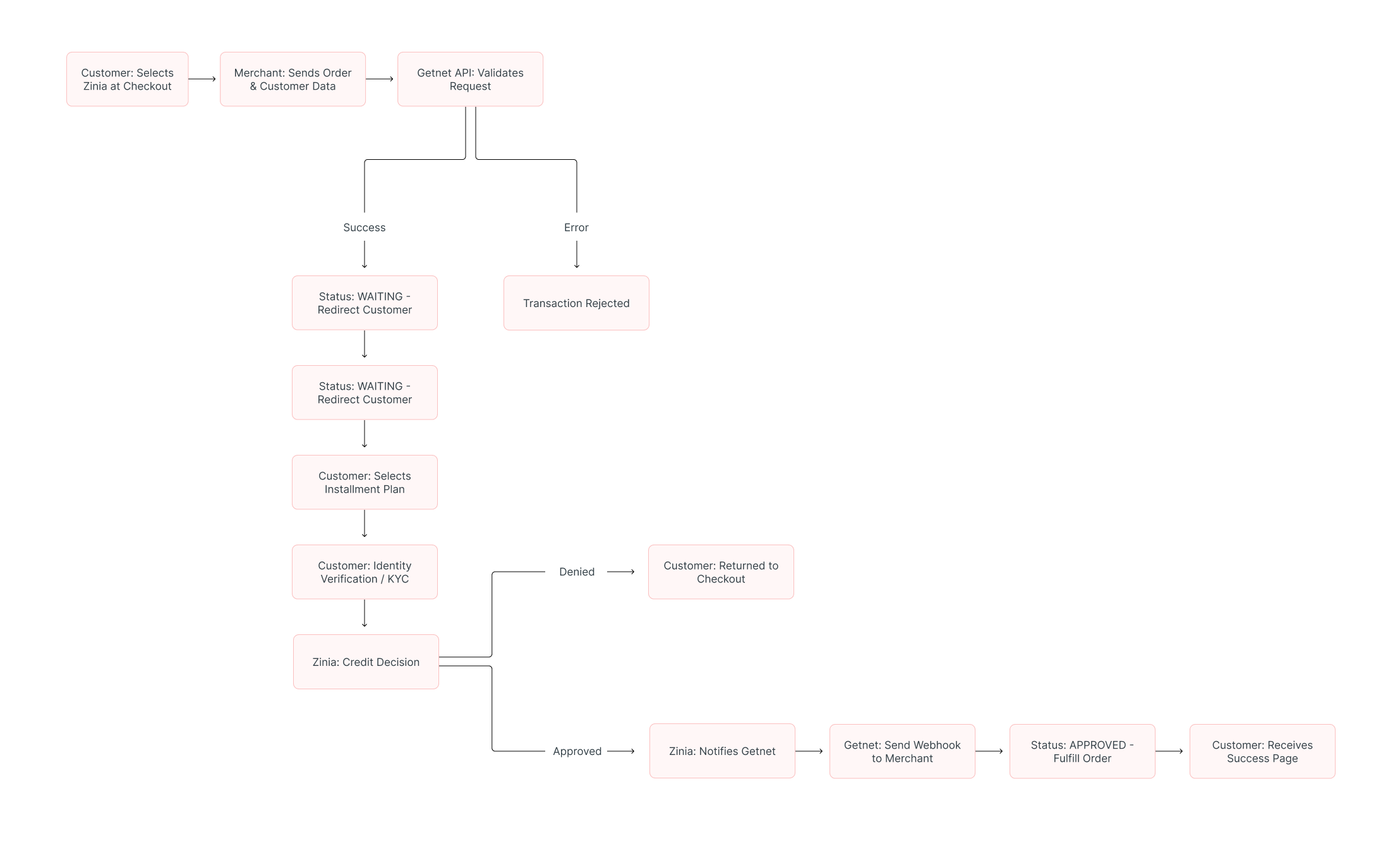
1. Create the Payment Request
Call the Create – Authorize endpoint with the attributes below. Detailed customer demographics and order items are strictly required for Zinia’s risk modeling.
| Attribute | Description | Required Value |
|---|---|---|
payment_method | BNPL payment method | BNPL |
brand | Brand identifier | ZINIA |
amount | Transaction amount in cents | Integer (e.g., 600 for €6.00) |
currency | ISO currency code | EUR |
order.items | Array of items being purchased | Mandatory |
Sample Request:
curl --location --request POST 'https://api.pre.globalgetnet.com/dpm/payments-gwproxy/v2/payments' \
--header 'Content-Type: application/json' \
--header 'Authorization: Bearer <ACCESS_TOKEN>' \
--data-raw '{
    "idempotency_key": "ed2851df-9c94-4229-8848-32043e84f9a1",
    "request_id": "de311099-20b4-4d50-b3c6-08d90c52242c",
    "order_id": "ttk9vnt8qwj7",
    "data": {
        "amount": 600,
        "currency": "EUR",
        "customer_id": "42412312523",
        "payment": {
            "payment_id": "ttk9vnt8qwj7",
            "payment_method": "BNPL",
            "brand": "ZINIA",
            "soft_descriptor": "ZINIA TESTE"
        },
        "additional_data": {
            "callback_url": "https://webhooksite/6ca8fe64-73e2-4400-a760-94c41e92ab43",
            "customer": {
                "email": "[email protected]",
                "document_number": "50506468",
                "document_type": "uyci",
                "name": "Jose ZINIA_AP",
                "phone_number": "34700000000",
                "billing_address": {
                    "street": "R a",
                    "number": "1",
                    "district": "B",
                    "city": "City Z",
                    "state": "SP",
                    "country": "ES",
                    "postal_code": "05781000",
                    "complement": "N/A"
                }
            },
            "order": {
                "items": [
                    {
                        "name": "Item2",
                        "quantity": 1,
                        "sku": "sku1",
                        "price": 600
                    }
                ]
            }
        }
    }
}'
2. Handling the Response and Redirection
The initial response returns a status: WAITING. You must redirect the customer to the financing portal using the data provided in the additional_data._links array.
Sample Response:
{
    "payment_id": "ttk9vnt8qwj7",
    "status": "WAITING",
    "reason_message": "Waiting payment flow.",
    "additional_data": {
        "signature": "c5LN2xXHUtardFVg...",
        "_links": [
            {
                "rel": "apm_html",
                "type": "POST",
                "href": "https://sis-i.redsys.es:25443/sis/realizarPago"
            }
        ],
        "merchant_data": "eyJvcmRlcl9pZCI6...",
        "signature_version": "T25V2"
    }
}
To complete the flow, construct a form or fetch request using the following parameters:
- Method: Use the HTTP method specified in
type(usually POST). - Endpoint: Redirect to the
hrefprovided in theapm_htmllink. - Data: You must include the
merchant_data,signature, andsignature_versionin the redirect payload.
3. Verify Payment Status
After the customer completes the authorization flow at Zinia, they are returned to your site. Simultaneously, Getnet sends a notification to your callback_url.
| Status | Description | Next Action |
|---|---|---|
| WAITING | Request successful; customer must authorize financing. | Redirect customer to Zinia portal. |
| APPROVED | Financing approved and payment captured. | Fulfill the order. |
| DENIED | The financing was rejected by the risk engine. | Display error and offer another payment method. |
You can also check the status manually using the Get Transaction endpoint.
Read More
- Review Authentication for token management.
- Explore Webhooks to handle asynchronous status notifications.