

Create a payment with card verification
This document applies to the following countries:
| Brazil | Chile | Mexico | Spain | Uruguay |
|---|
In Getnet’s Web Checkout, card verification is a process used to validate a customer’s credit card without completing a full charge. During this process, the payment system verifies the card details and checks with the issuing bank to confirm that the card is valid and authorized for transactions. This verification helps ensure the card can be used for future payments and reduces the risk of fraud before an actual transaction is processed.
How it works
Use card verification when you want to validate a customer’s credit card without completing a full charge — confirming with the issuing bank that the card is valid and authorized before an actual transaction is processed. Key characteristics:
- Zero-amount validation — the process verifies the card details without crediting any amount to the card. Getnet automatically sends an internal zero-amount transaction so the issuer can validate the card’s existence and eligibility.
- Fraud reduction — validating the card up front helps ensure it can be used for future payments and reduces the risk of fraud before a real transaction runs.
- No financial transaction — there is no charge; the result is a
VERIFIEDstatus, not a payment. - Optional tokenization — after a successful verification, you can tokenize the card and use
number_tokenin place of the raw card number in later payment requests, reducing PCI DSS scope.
The end-to-end flow involves the buyer, the Checkout page, and the Getnet WebCheckout / Regional API:

Before you start
Before following the steps, you need to:
- Configuring your Web Chekout by Portal or by API (depending on your location).
- Generate your token following the Authentication document.
Payment intent with card verification
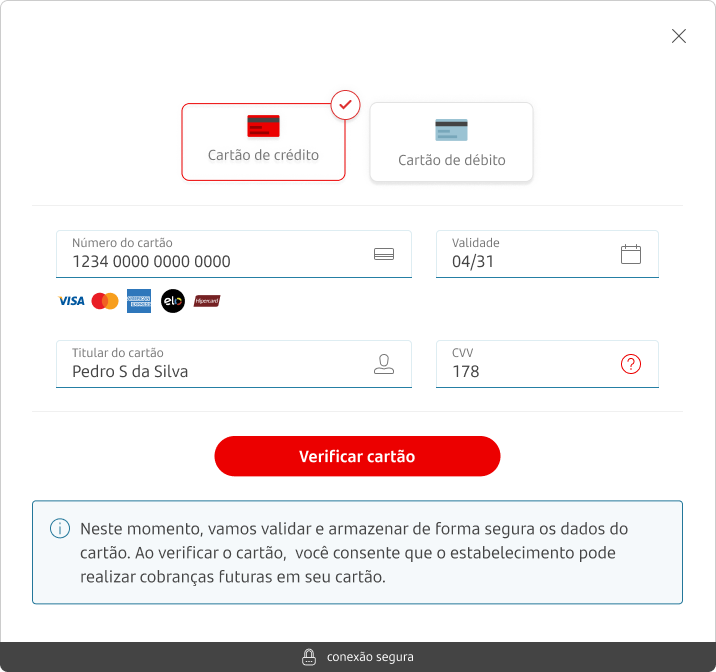
To pass through the Card Verification, these parameters must be send on the payment intent.
| Endpoint |
|---|
POST /payment-intent |
Required fields
| Field | Type | Description | Example |
|---|---|---|---|
configurations | Object | Set of payment options. | — |
preauthorization | Boolean | Indicates if it is a pre-authorized payment type. | false |
card_verification | Boolean | Indicates if it is a card verification payment type. | true |
3ds | Boolean | Indicates if it is a 3DS payment type. | false |
The following code block shows the fields that must be send in the payment intent endpoint.
"configurations": {
        "preauthorization": false,
        "card_verification": true,
        "3ds": false
}Argentina:
card_verificationandpreauthorizationare not available for Argentina.
Step 1: Verifing a card
A zero amount payment starts with authorization. This step validates the customer and card’s details. Use the Card verification endpoint to initiate the transaction.
The table below lists the fields you need to send:
| Field | Type | Description | Example |
|---|---|---|---|
number_token | String | Tokenized card number. | dfe05208b105578c070f806c80abd3a |
brand | String | Card Brand. | Mastercard |
cardholder_name | String | Buyer’s name printed on the card. | JOAO DA SILVA |
expiration_month | String | Two-digit card expiration month. | 12 |
expiration_year | String | Two-digit card expiration year. | 28 |
security_code | String | Security code. CVV or CVC. | 123 |
The following code block shows an example of a request and response to authorize a payment.
Example of request:
curl --request POST \
  --url https://api.pre.globalgetnet.com/dpm/cofre-gw-proxy/v1/cards/verification \
  --header 'authorization: Bearer ' \
  --header 'content-type: application/json' \
  --header 'x-seller-id: 54f88e68-7764-4e87-8830-756b1e2c02f8' \
  --header 'x-transaction-channel-entry: XX' \
  --data '{
  "number_token": "dfe05208b105578c070f806c80abd3a",
  "brand": "Mastercard",
  "cardholder_name": "JOAO DA SILVA",
  "expiration_month": "12",
  "expiration_year": "28",
  "security_code": "123"
}'Example of response:
{
  "status": "VERIFIED",
  "verification_id": "ae267804-503c-4163-b1b1-f5da5120b74e",
  "authorization_code": "6964722471672911",
  "transaction_id": "1002217281190421"
}The Getnet system automatically sends an internal zero-amount transaction along with the card details, allowing the issuer to validate the card’s existence and eligibility. After a successful validation, you can create the payments.
This is a verification with no financial transaction, in which no amount is credited to the card.
Step 2: Payment with Tokenize Card Data
Instead of sending the raw card number in your payment request, you can use tokenization to enhance security and reduce PCI DSS compliance scope. To use a tokenized card:
- Tokenize the card by calling the Card Tokenization endpoint with the
card_numberandcustomer_id. - In your payment request, replace the
card_numberfield withnumber_tokenusing the token value received from the tokenization endpoint.
When using number_token, you must exclude the card_number property from the request. For complete details on tokenization, see the Tokenization and Vault documentation.
| Field | Type | Description | Example |
|---|---|---|---|
card_number | String | Card Number. | 5155901222280001 |
customer_id | String | Buyer identifier. | customer_21081826 |
Use the Card Tokenization endpoint to tokenize the card.
Example of request:
curl --request POST \
  --url https://api-sbx.globalgetnet.com/dpm/cofre-gw-proxy/v1/tokens/card \
  --header 'authorization: Bearer <your-token>' \
  --header 'content-type: application/json' \
  --header 'x-seller-id: 54f88e68-7764-4e87-8830-756b1e2c02f8' \
  --data '{
  "card_number": "5155901222280001",
  "customer_id": "customer-123"
}'Example of response:
{
  "number_token": "dfe05208b105578c070f806c80abd3af09e246827d29b866cf4ce16c205849977c9496cbf0d0234f42339937f327747075f68763537b90b31389e01231d4d13c"
}See also
You can explore more payments of the Getnet Web Checkout API:
- Learn how to create a payment with pre-authorization.
- Learn how to create a payment with 3DS.