

Create Payments with Installments
This guide explains how to process installment-based payment transactions using the Getnet Global API. Installments allow customers to divide the total purchase price into several smaller, equal amounts paid over an agreed period of time, providing greater flexibility instead of requiring full payment upfront. This payment method’s implementation depends on card support availability and regional regulations.
Requirements
Before following the steps, you need to:
- Create your account by contacting the Integration Support team to get your API credentials
client_idandclient_secret. - Generate your token with your credentials using the Authentication endpoint.
Getnet provides a Postman Collection to help you to replicate these use cases locally. You can also test the API in sandbox using the API Reference available in the documentation.
Use Cases Specifics
When integrating any Getnet solution, market-specific requirements apply. Be sure to review the resources below before you go live:
You can also use test cards to simulate specific scenarios. More information about specific requirements for each country can be found in the Developer Resources section of the Getnet documentation.
Payment facilitators: When Getnet enables your credential as a payment facilitator, you must also send the
data.sub_merchantobject on this request. See Payment Facilitators.
Platform availability
Installment support varies by country and card brand. For a complete reference of installment rules, available card schemes, and plan types by market, see Installments Rules and Availability.
Understanding How Installment Payments Work
An installment payment is created as a single payment transaction, not multiple separate authorizations. When you create an installment payment, you make one API call, and the settlement/capture is handled automatically by the card network and issuing banks according to the installment plan type.
How Settlement Works
Each country has different installment plan types with specific schemas and settlement models. The settlement process varies depending on the plan selected:
- Some plans settle the full amount to the merchant at once, with the bank collecting installments from the customer over time.
- Other plans settle to the merchant in monthly installments automatically.
- The customer may or may not pay interest depending on the plan type.
You do not need to (and cannot) manually capture each installment separately. The installment breakdown and settlement schedule are managed automatically by the card network and acquiring bank based on the plan type selected.
For detailed information about installment plans, schemas, and settlement models available in each country, see Installments Rules and Availability.
Installment Payment Process
This section guides you through creating an installment payment transaction. The process involves two main steps: requesting available installment offers and submitting the payment with the selected installment option.
The diagram below illustrates the complete installment payment flow:
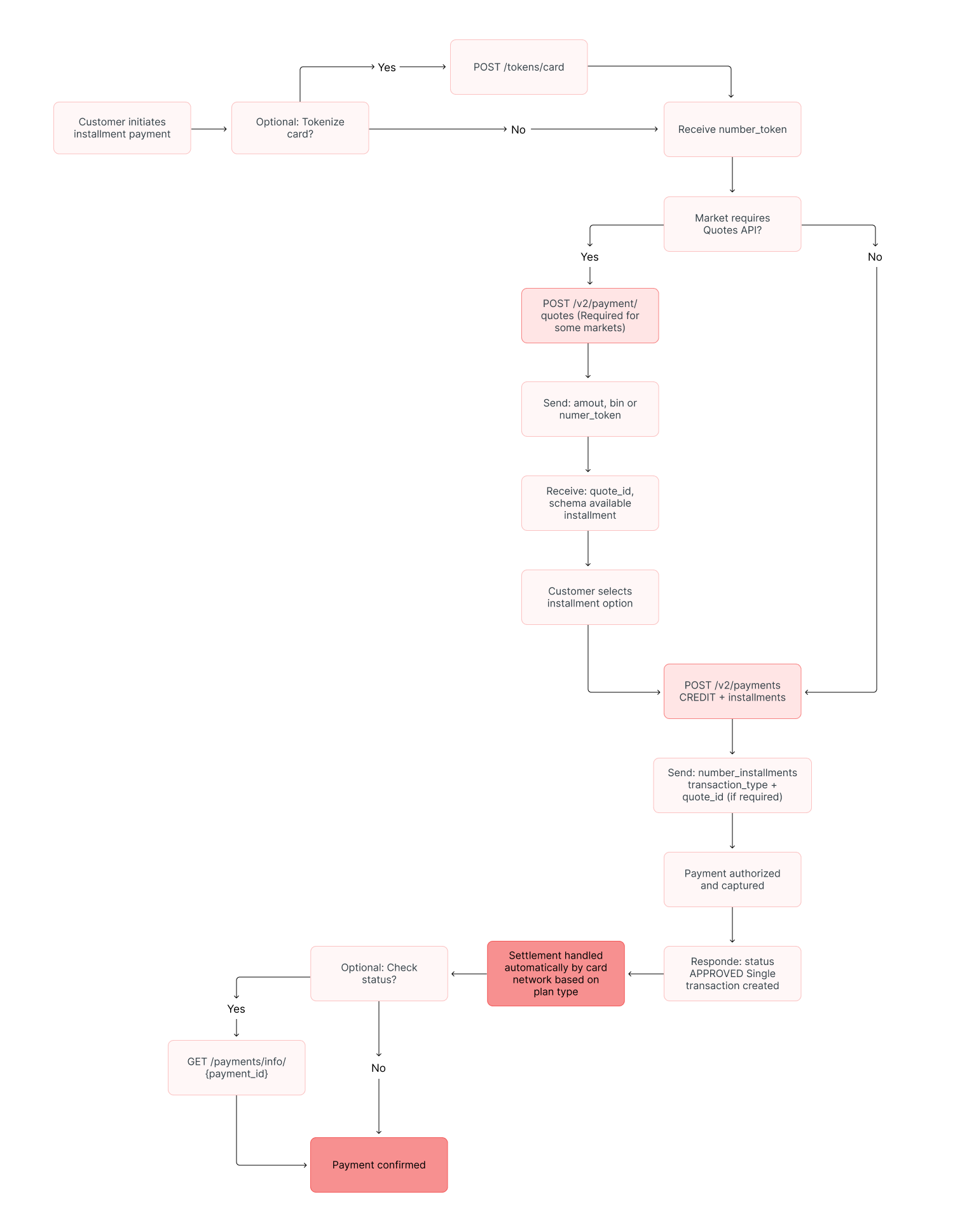
This guide demonstrates the single-step payment flow (Authorize & Capture). However, installment payments are also fully supported in the two-step flow (Pre-authorized). To use the Pre-authorized flow, follow the instructions in the Pre-authorized Payment guide, ensuring you include the installment object fields described below in your authorization request.
Quote ID Generation
When implementing installments in Argentina and Chile markets, it is mandatory to include the quote_id value in the API installment requests so transactions can be processed correctly. This field is used to calculate interest rates, taxes, and other requirements prior to payment authorization.
Interest fees calculations
For this process, there are two alternatives for merchants and partners, depending on their needs:
- Calculated by User: The merchant calculates the interest fees externally and informs the API through the
amountfield. On API calls, thequote_idmust be generated underno_interest. - Calculated by Getnet: The merchant relies on Getnet’s interest fees calculations that include up-to-date issuer/government information and therefore won’t have to calculate them externally. On API calls, the
quote_idmust be generated underwith_interest.
Tokenize Card Data (Optional)
Instead of sending the raw card number in your payment request, you can use tokenization to enhance security and reduce PCI DSS compliance scope. To use a tokenized card:
- Tokenize the card by calling the Card Tokenization endpoint with the
card_numberandcustomer_id. - In your payment request, replace the
card.numberfield withcard.number_tokenusing the token value received from the tokenization endpoint.
If you send card.number_token, you don’t need to include the card.number property in the request. You can use either the raw card number or the tokenized version, but not both. For complete details on tokenization, see the Tokenization and Vault documentation.
Step 1: Request Available Installment Offers
Before initiating a payment, you must query the available installment offers for the selected card and transaction amount using the Get Installments endpoint.
The Getnet API expects to receive the following details in the request:
| Attribute | Description | Required |
|---|---|---|
amount | Total amount to be paid (in cents). | Yes |
bin | First 6 or 9 digits of the card (preferably 9; in Uruguay’s case, 16 digits are required). | Yes |
installment_type_filter | Optional property to filter results. Possible values: no_interest or with_interest. | No |
Depending on your market requirements, you can send either the card bin (Bank Identification Number) or, if you’ve already tokenized the card, you can use number_token instead. Both provide the necessary information for the API to return available installment options.
The following code block shows an example request:
curl --request POST \
  --url https://api-sbx.globalgetnet.com/dpm/payments-gwproxy/v2/payments/quotes \
  --header 'authorization: Bearer ' \
  --header 'content-type: application/json' \
  --header 'x-seller-id: 54f88e68-7764-4e87-8830-756b1e2c02f8' \
  --data '{
  "amount": 100000,
  "bin": "515590122",
  "installment_type_filter": "no_interest"
}'Example response with available installment options:
{
  "quote_id": "4a29251d-41af-41fc-ac74-fa131e215e1b",
  "amount": 100000,
  "currency": "BRL",
  "credits": [
    {
      "number_installments": 1,
      "installment_value": 100000,
      "total_amount": 100000,
      "schema": "no_interest",
      "type": "no_interest"
    },
    {
      "number_installments": 3,
      "installment_value": 33334,
      "total_amount": 100002,
      "schema": "no_interest",
      "type": "no_interest"
    },
    {
      "number_installments": 6,
      "installment_value": 16667,
      "total_amount": 100002,
      "schema": "no_interest",
      "type": "no_interest"
    }
  ]
}You’ll need to extract the following properties from the response to use in the next step:
quote_id- Unique identifier for the installment quoteschema- Code that groups credits by category
Step 2: Create the Payment with Installments
Once the customer has selected their preferred installment option, use the Create - Authorize endpoint to process the payment.
The Getnet API expects to receive the installment details within the additional_data object. If the installment object is included, the payment will be made according to the previously defined number of installments; otherwise, the payment will be made in a single installment.
Country-specific requirements: Some markets may require additional mandatory fields. In Uruguay you must include a
ratesarray with theivakey. Sendregional_regulation_codeonly when the transaction qualifies for a regional regulation or tax benefit. Each entry takes acode(17934or19210) and an optionalinvoiceof up to 9 alphanumeric characters. When you omit theinvoice, Getnet derives it from yourorder_id. Review the Taxes and Regulations reference for more information.
The table below lists the minimum fields you need to send:
| Attribute | Description | Required |
|---|---|---|
idempotency_key | Unique identifier to prevent duplicate charges. | Yes |
order_id | Merchant reference ID used for reconciliation. | Yes |
request_id | Trace identifier for idempotency audits and support follow-up. | Recommended |
data.amount | Transaction amount in cents. | Yes |
data.currency | ISO currency code used in the transaction. | Yes |
data.customer | Customer details (name, email, phone, document, full billing address). Mandatory in production to avoid antifraud blocks. | Yes (Prod) |
data.payment.payment_method | Must be CREDIT or DEBIT for installment payments. | Yes |
data.payment.transaction_type | Defines how the transaction is processed. Varies by country (see country-specific sections). | Yes |
data.payment.number_installments | Number of instalments. | Yes |
data.payment.card | Card data set (number, brand, expiration_month, expiration_year, security_code, cardholder_name). | Yes |
data.additional_data.installment | Installment object containing schema, type, and quote_id from Step 1. | Yes |
data.additional_data.device | Device fingerprint information (ip_address, device_id, finger_print) for antifraud analysis. | Yes (Prod) |
The objects required for antifraud validation must include the following fields:
| Object / Field | Description |
|---|---|
customer.first_name | Customer’s first name |
customer.last_name | Customer’s last name |
customer.email | Customer email address |
customer.phone_number | Phone number (international format) |
customer.document_type | Document type (e.g., CPF, DNI, etc.) |
customer.document_number | Document number (without punctuation) |
customer.billing_address.street | Street name |
customer.billing_address.number | Address number |
customer.billing_address.district | District or neighbourhood |
customer.billing_address.city | City |
customer.billing_address.state | State or province |
customer.billing_address.country | Country code (ISO) |
customer.billing_address.postal_code | Postal or ZIP code |
additional_data.device.ip_address | Customer’s IP address |
additional_data.device.device_id | Device fingerprint session ID (UUIDv4) |
additional_data.device.finger_print | Fingerprint hash generated by the antifraud script |
Antifraud data is mandatory for production environments. Transactions missing device fingerprint or customer information will be automatically blocked by antifraud teams to prevent fraud. See the Antifraud documentation for complete implementation details.
The following code block shows an example payment request with installments:
curl --request POST \
  --url https://api-sbx.globalgetnet.com/dpm/payments-gwproxy/v2/payments \
  --header 'authorization: Bearer ' \
  --header 'content-type: application/json' \
  --header 'x-seller-id: 54f88e68-7764-4e87-8830-756b1e2c02f8' \
  --header 'x-transaction-channel-entry: XX' \
  --data '{
  "idempotency_key": "63c7f8ee-51a6-470d-bb76-ef762b62bfb9",
  "request_id": "daac03dc-73db-453f-9bea-b1391669d5d3",
  "order_id": "ORDER-10187383",
  "data": {
    "amount": 100000,
    "currency": "BRL",
    "customer_id": "test",
    "customer": {
      "first_name": "John",
      "last_name": "Doe",
      "email": "[email protected]",
      "document_type": "CPF",
      "document_number": "12345678900",
      "phone_number": "+5511999999999",
      "billing_address": {
        "street": "Av. Paulista",
        "number": "1000",
        "complement": "Apto 101",
        "district": "Bela Vista",
        "city": "São Paulo",
        "state": "SP",
        "country": "BR",
        "postal_code": "01310-100"
      }
    },
    "payment": {
      "payment_method": "CREDIT",
      "save_card_data": false,
      "transaction_type": "INSTALL_NO_INTEREST",
      "number_installments": 3,
      "soft_descriptor": "LOJA*TESTE*COMPRA-123",
      "dynamic_mcc": 1799,
      "card": {
        "number": "5155901222260000",
        "expiration_month": "09",
        "expiration_year": "30",
        "cardholder_name": "Card Holder",
        "security_code": "517"
      }
    },
    "additional_data": {
      "installment": {
        "schema": "no_interest",
        "type": "no_interest",
        "quote_id": "4a29251d-41af-41fc-ac74-fa131e215e1b"
      },
      "device": {
        "ip_address": "192.168.1.1",
        "device_id": "63c7f8ee-51a6-470d-bb76-ef762b62bfb9",
        "finger_print": "1a2b3c4d5e6f7g8h9i0j"
      }
    }
  }
}'Example of response with status as APPROVED:
{
  "idempotency_key": "63c7f8ee-51a6-470d-bb76-ef762b62bfb9",
  "seller_id": "e0ed6f00-fdc5-46d6-9557-6a2cac641b09",
  "payment_id": "053de7f9-3725-437b-bdfc-bbf3ed0acb75",
  "order_id": "ORDER-10187383",
  "amount": 100000,
  "currency": "BRL",
  "status": "APPROVED",
  "payment_method": "CREDIT",
  "received_at": "2025-10-31T13:40:47.382Z",
  "transaction_id": "MCC50205G1020",
  "original_transaction_id": "MCC50205G1020",
  "authorized_at": "2025-10-31T13:40:47.382Z",
  "reason_code": "00",
  "reason_message": "captured",
  "acquirer": "GETNET",
  "soft_descriptor": "LOJA*TESTE*COMPRA-123",
  "brand": "MASTERCARD",
  "authorization_code": "204050",
  "acquirer_transaction_id": "405030304060404030501060",
  "installments": {
    "number_installments": 3,
    "installment_value": 33334,
    "total_amount": 100002
  }
}Step 3: Check the Payment Status (Optional)
The Create - Authorize response will show the status as APPROVED for successful installment payments.
Because some payments are processed asynchronously, the status can change over time. To get the latest status of a transaction, use the Get Transaction endpoint.
For real-time updates without polling, it is recommended to use Webhooks to receive notifications for every status change.
Country-Specific Installment Requirements
Each market has specific installment options, plan types, and implementation requirements. For detailed information about installment rules, available plans by card brand, and country-specific requirements (including required field values for the installment object), see Installments Rules and Availability.
Next Steps
Now that you have successfully created a payment with installments, you can explore more features of the Getnet Global API:
- Learn how to create Combined Payments.
- Read about 3DS Payments.
- Explore Pre-authorization Payments.