

Configure the payment link
This guide covers two configurations performed before or during the creation of a payment link: uploading images for products and configuring installments by country and card brand.
How it works
This guide covers two independent configurations performed before or during the creation of a payment link: uploading images for products, and configuring installments by country and card brand. Key characteristics:
- Product images — upload an image first to get an
image_id, then reference thatimage_idin theproductsarray when creating or updating the link. You can optionally retrieve an image’s binary content by its identifier. Accepted formats are PNG and JPEG, up to 250 MB. - Business configurations — merchants can optionally enable or disable specific payment operations (credit, debit, Boleto, PIX, and others), which determines the methods shown at checkout.
- Installments (credit only) — installments are configured per credit card brand, inside
payment.credit.brands[].supported_installments;nullor absent means a single payment. Card-based methods (credit,debit) use abrands[]array for per-brand config, while other methods use only the{ "enabled": true }toggle. - How the installment fields relate —
installmentslists the valid counts,installments_with_interestmarks which of those carry interest, andinstallments_with_increaseassigns a percentage rate to groups of installments. - Region-specific schemas — the
schemadetermines the installment rules and varies by country (for example,plan_lojista/plan_emissorin Brazil,plan_emisor/cuota_comercioin Chile andplan_prosain Mexico).
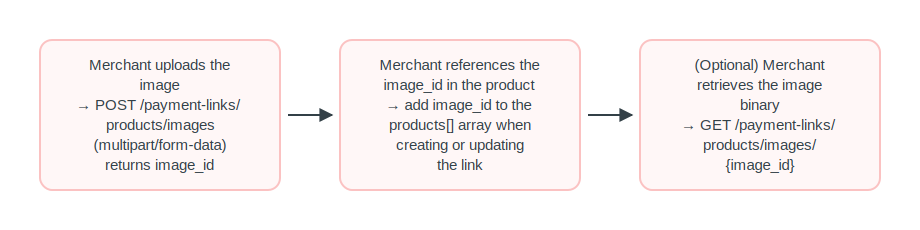
The product image configuration follows a short sequence:
Before you start
- Obtain an access token. See Authentication.
Product images
To display an image on a payment link product, upload the image first.
Use the image_id returned in the image_id field of the products object when creating or updating the link.
Step 1 - Upload the image
| Endpoint |
|---|
POST /payment-links/products/images |
Field filling rules:
Content-Type: multipart/form-data- Accepted formats:
image/png,image/jpeg - Maximum size: 250 MB
Required fields
| Attribute | Type | Description | Example |
|---|---|---|---|
file | binary | Image file (PNG or JPEG, max 250 MB) | product-photo.png |
Example of request
curl https://api-sbx.pre.globalgetnet.com/dpy/payment-link/v1/payment-links/products/images \
  --request POST \
  --header 'Authorization: Bearer eyJhbGciOiJSUzI1NiIsInR5cCI6IkpXVCJ9...' \
  --header 'Content-Type: multipart/form-data' \
--form 'file='Example of response
{
    "image_id": "6697e354-ab4a-11eb-bcbc-0242ac130002",
    "original_name": "product-photo.png",
    "mime_type": "image/png",
    "upload_at": "2026-06-10T14:30:00.000Z"
}Step 2 — Reference the image in a product
Use the image_id returned when building the products array in the creation or update of the link:
"products": [
   {
      "product_type": "physical_goods",
      "title": "Camiseta Oficial Getnet",
      "amount": 9990,
      "quantity": 1,
      "image_id": "6697e354-ab4a-11eb-bcbc-0242ac130002"
   }
]Step 3 (optional) — Retrieve the image
Use this endpoint to retrieve the binary content of an image by its identifier.
| Endpoint |
|---|
GET /payment-links/products/images/{image_id} |
| Field | Type | Description | Example |
|---|---|---|---|
image_id | string | Unique identifier of the image | 3fa85f64-5717-4562-b3fc-2c963f66afa6 |
Example of request
curl https://api-sbx.pre.globalgetnet.com/dpy/payment-link/v1/payment-links/products/images/3fa85f64-5717-4562-b3fc-2c963f66afa6 \
--header 'Authorization: Bearer eyJhbGciOiJSUzI1NiIsInR5cCI6IkpXVCJ9...'The 200 OK response returns the binary content with the corresponding Content-Type (image/png or image/jpeg).
Example of response
{
  "type": "string",
  "contentMediaType": "application/octet-stream"
}Business configurations
Merchants can optionally configure their Payment Link by enabling or disabling specific payment operations. These settings determine which payment methods, such as Credit Cards, Debit Cards, Boleto (bank slip) or PIX (instant payment), are displayed during the checkout process.
Installments
Installments are configured within each credit card brand, in payment.credit.brands[].supported_installments. Each entry is an InstallmentPlan object representing an installment schema offered by the acquirer or issuer.
Card-based methods (credit, debit) have a brands[] array for per-brand configuration. Other methods use only the toggle { "enabled": true }. Installments apply only to credit; null or absent means a single payment.
To understand the rules for installments for each country access Installments rules and availability
| Endpoint |
|---|
POST /payment-links/business-configurations |
Required fields
| Field | Type | Description | Example |
|---|---|---|---|
enabled | boolean | Enables or disables this brand | true or false |
brand | string | Card brand | VISA, MASTERCARD, AMEX, ELO |
schema | string | Schema identifier — determines the installment rules. Region-specific | plan_lojista |
Optional fields
| Field | Type | Description | Example |
|---|---|---|---|
currencies | string | Currency codes (default: seller’s country currency) | BRL, CLP or MXN |
threeds | boolean | Requires 3D Secure authentication for this brand | true or false |
supported_installments | object | Installment plans (credit only). Null or absent = single payment | --- |
schema_name | string | Human-readable plan name | Plan Lojista |
installments | integer | Available installment counts | [2,3,6,12] |
installments_with_interest | integer | Subset of installments that carry interest. Empty = all without interest | [6,9,12] |
installments_with_increase | object | Groups of installments with an applied increase rate | --- |
Example of request
curl https://api-sbx.pre.globalgetnet.com/dpy/payment-link/v1/payment-links/business-configurations \
  --request POST \
  --header 'Authorization: Bearer eyJhbGciOiJSUzI1NiIsInR5cCI6IkpXVCJ9...' \
  --header 'Content-Type: application/json' \
  --data '{
  "expiration": "2026-12-31T23:59:59",
  "max_orders": 100,
  "request_delivery_address": false,
  "payment": {
    "credit": {
      "enabled": true,
      "brands": [
        {
          "enabled": true,
          "brand": "VISA",
          "currencies": [
            "BRL"
          ],
          "threeds": true,
          "supported_installments": [
            {
              "schema": "plan_lojista",
              "schema_name": "Plan Lojista",
              "installments": [2,3,4,5,6,7,8,9,10,11,12],
              "installments_with_interest": [6,9,12]
            }
          ]
        }
      ]
    },
    "debit": {
      "enabled": true,
      "brands": [
        {
          "enabled": true,
          "brand": "VISA",
          "currencies": [
            "BRL"
          ],
          "threeds": true
        }
      ]
    },
    "bankslip": {
      "enabled": true
    },
    "instant_payment": {
      "enabled": true
    },
    "google_pay": {
      "enabled": false
    },
    "apple_pay": {
      "enabled": false
  },
  "currency": "BRL"
}'How the fields relate
-
installmentslists the valid installment counts. For example,[2, 3, 6, 12]allows the buyer to pay in 2, 3, 6, or 12 installments. -
installments_with_interestindicates which of those installments carry interest. Ifinstallments = [2,3,6,12]andinstallments_with_interest = [6,12], then 2 and 3 installments are interest-free, while 6 and 12 carry interest. -
installments_with_increaseprovides rate-based pricing: each entry groups installments and assigns a percentage rate.
InstallmentsWithIncrease object
| Field | Type | Required | Description |
|---|---|---|---|
installments | integer[] | Yes | Installment counts to which this rate applies |
rate | number | Yes | Increase rate as a percentage (e.g., 1.5 = 1.5%) |
Example:
"installments_with_increase": [
  { "installments": [3, 6], "rate": 1.5 },
  { "installments": [9, 12], "rate": 2.99 }
]In this case, 3 and 6 installments have a 1.5% increase, and 9 and 12 installments have a 2.99% increase.
Regional schemas
| Country | Schema(s) | Currency | Typical brands |
|---|---|---|---|
| Brazil (BR) | plan_lojista, plan_emissor | BRL | VISA, MASTERCARD, AMEX, ELO, HIPERCARD |
| Chile (CH) | plan_emisor, cuota_comercio | CLP | VISA, MASTERCARD, AMEX |
| Mexico (MX) | plan_prosa | MXN | VISA, MASTERCARD, AMEX, CARNET |
Examples by country
Brazil — plan_lojista + plan_emissor
{
    "enabled": true,
    "brand": "VISA",
    "currencies": ["BRL"],
    "threeds": true,
    "supported_installments": [
       {
          "schema": "plan_lojista",
          "schema_name": "Plan Lojista",
          "installments": [2,3,4,5,6,7,8,9,10,11,12],
          "installments_with_interest": [6,9,12]
       },
       {
          "schema": "plan_emissor",
          "schema_name": "Plan Emissor",
          "installments": [2,3,4,5,6],
          "installments_with_interest": []
       }
    ]
}Chile - plan_emisor + cuota_comercio
{
    "enabled": true,
    "brand": "VISA",
    "currencies": ["CLP"],
    "threeds": true,
    "supported_installments": [
      {
        "schema": "plan_emisor",
        "schema_name": "Plan Emisor",
        "installments": [2, 3, 4, 5, 6],
        "installments_with_interest": [4, 5, 6]
      },
      {
        "schema": "cuota_comercio",
        "schema_name": "Cuota Comercio",
        "installments": [2, 3, 6, 9, 12],
        "installments_with_interest": [6, 9, 12]
      }
    ]
}Mexico — plan_prosa
{
    "enabled": true,
    "brand": "VISA",
    "currencies": ["MXN"],
    "threeds": true,
    "supported_installments": [
      { "schema": "plan_prosa", "schema_name": "Plan Prosa", "installments": [3,6,9,12], "installments_with_interest": [3,6,9,12] }
    ]
}Example with installments_with_increase
{
    "enabled": true,
    "brand": "MASTERCARD",
    "currencies": ["BRL"],
    "threeds": true,
    "supported_installments": [
       {
          "schema": "plan_lojista",
          "schema_name": "Plan Lojista",
          "installments": [2,3,4,5,6,7,8,9,10,11,12],
          "installments_with_interest": [6,9,12],
          "installments_with_increase": [
             { "installments": [2,3,4,5,6], "rate": 1.5 },
             { "installments": [7,8,9,10,11,12], "rate": 2.99 }
          ],
          "single_increase_rate": false
       }
    ]
}