

Efecty

A financial service provider that offers various financial services such as money transfers, bill payments, and more.
The API integration supports Pay-ins (generating a payment reference for cash deposits) and Payouts (enabling customers to withdraw cash at an Efecty location). All flows are confirmed asynchronously via webhook.
Requirements
Before integrating Efecty you need to:
- Generate an access token through the Authentication endpoint.
- Configure a public HTTPS
callback_urlto receive asynchronous status updates. - For Payouts: Ensure your merchant account has sufficient balance to cover the disbursement amount.
Efecty is only available in Colombia and expects COP. Contact your Account Manager to enable this payment method for your seller account.
Use Cases Specifics
When integrating any Getnet solution, market-specific requirements apply. Efecty is only available in Colombia and only for COP and USD currency. To know more about the specific requirements of Colombia, be sure to review the resources below before you go live:
Characteristics
The table below summarizes the shared behavior and requirements for Efecty payments.
| Capability | Details |
|---|---|
| Customer interaction | Redirect / Voucher: Customer receives a reference code to pay at a physical store. |
| Confirmation | Asynchronous: initial PENDING status, then APPROVED or DECLINED via webhook. |
| Notifications | Webhooks for asynchronous status updates when the cash payment is processed. |
Available features
Use the matrix below to confirm the scenarios currently supported for Efecty.
| Payment flow | Supported countries | Purchases | Refunds | Partial refunds | Pre-authorizations | Payouts |
|---|---|---|---|---|---|---|
| Redirect | Colombia | ✅ | ❌ | ❌ | ❌ | ✅ |
Payment flow
This section guides you through the complete process of implementing Efecty payments. The diagram below provides an overview of the Efecty payment process:

Supported Flow
This is the payment flow currently supported by Getnet:
- Efecty Payment (Deposit / Cash Pay-in): User pays cash at an Efecty location. Flow is redirect/voucher-based.
This operation is asynchronous; the final state is only confirmed when Getnet receives the webhook.
1. Create the payment request
Call the Create – Authorize endpoint with the attributes below.
The table outlines the minimum fields required for Efecty payment.
| Attribute | Description | Required value |
|---|---|---|
payment_method | Cash payment method | CASH_PAYMENT |
brand | Brand’s identifier | EFECTY |
callback_url | Where status updates are sent | Your HTTPS endpoint |
amount | Transaction amount in cents | Integer (e.g. 5000 for €50.00) |
currency | ISO currency code | COP or USD |
order_id | Merchant reference for reconciliation | Unique string |
curl --location --request POST '[https://api.pre.globalgetnet.com/dpm/payments-gwproxy/v2/payments](https://api.pre.globalgetnet.com/dpm/payments-gwproxy/v2/payments)' \
--header 'Content-Type: application/json' \
--header 'authorization: Bearer <your-token>' \
--data-raw '{
    "idempotency_key": "32f6208d-4be0-4430-a2cd-898b4b80f9c4",
    "request_id": "1d4daf69-ea17-4e5b-87c7-1f584eb52bc0",
    "order_id": "355413515499",
    "data": {
        "amount": 500001,
        "currency": "COP",
        "customer_id": "a354740d-bea2-46f7-8054-75823992a34c",
        "payment": {
            "payment_id": "1c41f4e1-5eab-41d4-a362-107b8308eb58",
            "payment_method": "CASH_PAYMENT",
            "brand": "EFECTY",
            "soft_descriptor": "EFECTY TESTE"
        },
        "additional_data": {
            "callback_url": "https://localhost:8080/notification/fake/1",
            "customer": {
                "email": "[email protected]",
                "document_number": "50506468",
                "document_type": "uyci",
                "name": "Jose da Silva",
                "phone_number": "34700000000",
                "billing_address": {
                    "street": "R a",
                    "number": "1",
                    "district": "B",
                    "city": "City Z",
                    "state": "SP",
                    "country": "CO",
                    "postal_code": "05781000",
                    "complement": "N/A"
                }
            },
            "order": {
                "items": [
                    {
                        "name": "Item2",
                        "quantity": 1,
                        "sku": "sku1",
                        "price": 500001
                    }
                ]
            }
        }
    }
}'The response contains the redirect_url, which must be used to redirect the customer to Efecty (or display the reference code). The transaction is immediately stored as pending in Getnet.
{
  "idempotency_key": "be278973-35eb-4c45-8619-2800d62b33b6",
  "seller_id": "2ab3e585-3607-467e-b2e8-420fcd45f48e",
  "payment_id": "772f951479c6514b1d9c4e8fd4808fe6",
  "order_id": "ORDER-10187383",
  "amount": "5000",
  "currency": "COP",
  "status": "PENDING",
  "payment_method": "EFECTY",
  "received_at": "2025-11-11T11:51:54.569Z",
  "redirect_url": "[https://efecty-payment-instructions.test/ref/XYZ123](https://efecty-payment-instructions.test/ref/XYZ123)",
  "transaction_id": "772f951479c6514b1d9c4e8fd4808fe6",
  "reason_code": "00",
  "reason_message": "Waiting for customer approval in Efecty."
}2. User Experience flow
- The customer is redirected to the third party page to see the payment instructions.
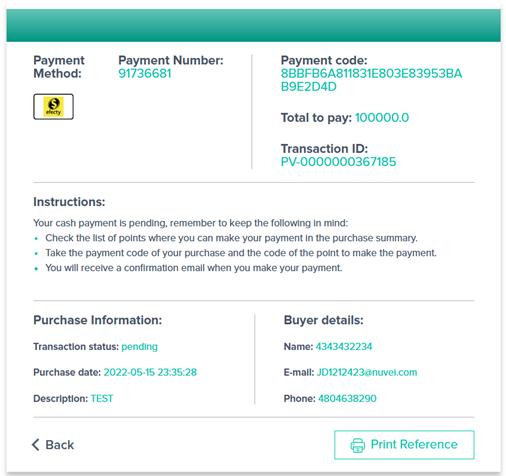
- The customer completes the deposit offline using the code they receives.
- Once the customer completes the deposit offline, a notification with status is sent.
3. Verify payment status
When the customer completes the payment, a webhook notification is sent with the updated payment status. You can also check the payment status using the Get Transaction endpoint.
Business Rules
payment_methodmust beCASH_PAYMENT(withbrandset toEFECTY).- Currencies supported:
COP. - Payment is an asynchronous operation.
Payouts
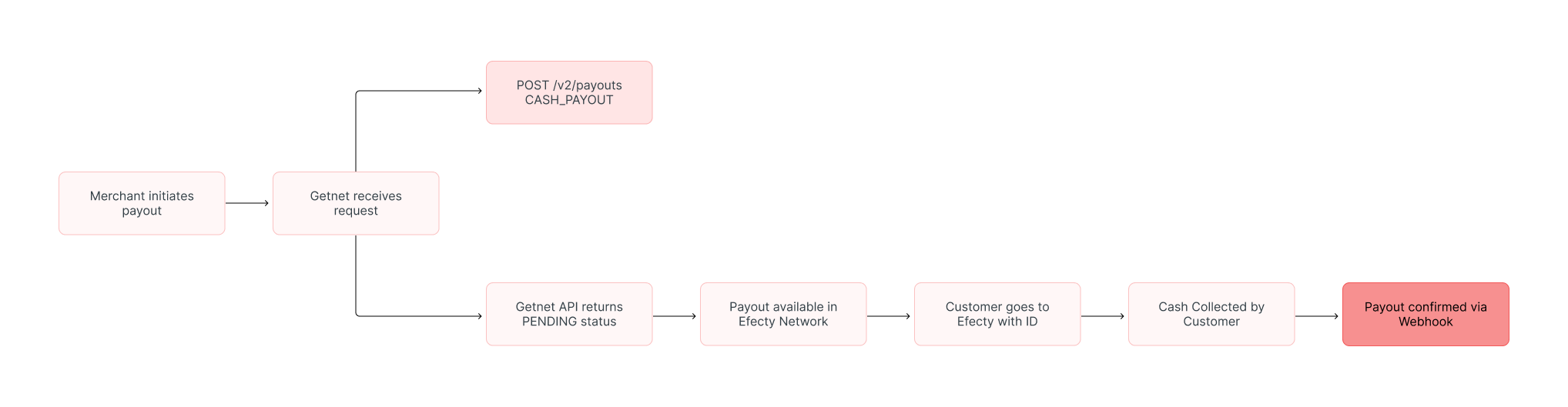
The Efecty Payout solution allows merchants to enable Cash Pickups. The merchant disburses funds, and the beneficiary goes to any Efecty location in Colombia to withdraw the cash in person.
Characteristics
The table below summarizes the behavior and requirements for Efecty Payouts.
| Capability | Details |
|---|---|
| Transaction Type | Cash Disbursement (Merchant sends funds -> User picks up Cash). |
| Confirmation | Asynchronous — A webhook notification informs the merchant when the cash has been collected by the user. |
| Data Requirements | Document Number (ID): Critical. The user must present their Government ID at the store to collect the money. |
Payout flow
The diagram below illustrates the business flow for an Efecty Payout:
1. Create the payout request
To initiate the transfer, call the Create Payout endpoint. You must specify the payment_method as CASH_PAYOUT and provide the customer’s identity details.
Ensure the customer.document_number matches the beneficiary’s physical ID exactly, or they will be denied the withdrawal at the branch.
Sample Request:
curl --location --request POST '[https://api.pre.globalgetnet.com/dpm/payments-gwproxy/v2/payouts](https://api.pre.globalgetnet.com/dpm/payments-gwproxy/v2/payouts)' \
--header 'Content-Type: application/json' \
--header 'x-seller-id: your-seller-id' \
--header 'country: CO' \
--header 'Authorization: Bearer <ACCESS_TOKEN>' \
--data-raw '{
    "idempotency_key": "payout-efecty-001",
    "request_id": "req-efecty-001",
    "order_id": "payout-ref-9988",
    "data": {
        "amount": 100000,
        "currency": "COP",
        "customer_id": "cust-002",
        "payment": {
            "payment_method": "CASH_PAYOUT",
            "brand": "EFECTY",
            "soft_descriptor": "PAYOUT MERCHANT"
        },
        "additional_data": {
            "callback_url": "[https://your-domain.com/webhook/payouts](https://your-domain.com/webhook/payouts)",
            "customer": {
                "email": "[email protected]",
                "document_number": "12345678",
                "document_type": "CC",
                "first_name": "Juan",
                "last_name": "Perez"
            }
        }
    }
}'Sample Response:
{
  "idempotency_key": "payout-efecty-001",
  "seller_id": "your-seller-id",
  "payment_id": "payout-efecty-trx-5566",
  "order_id": "payout-ref-9988",
  "amount": "100000",
  "currency": "COP",
  "status": "PENDING",
  "payment_method": "CASH_PAYOUT",
  "received_at": "2025-11-20T14:30:00.000Z",
  "reason_code": "00",
  "reason_message": "Payout registered. Waiting for beneficiary pickup."
}2. Verify payout status
The request is processed asynchronously. Do not poll the API; instead, listen for the Webhook notification sent to your callback_url.
APPROVED: The customer has successfully collected the cash at the branch.DECLINED: The payout expired (was not picked up in time) or was cancelled.
Read more
- Review Authentication for token management and security best practices.