

Refund a Payment
This document applies to the following countries:
| Brasil | Chile | Mexico | Spain | Uruguay |
|---|
This guide explains how to process cancellations and refunds for previously authorized payments using the Getnet Web Checkout via Global API. Depending on when the refund is requested, the system handles it differently: same-day refunds are processed as cancellations (voiding the transaction before settlement), while next-day refunds are processed as adjustments (after settlement has occurred).
Refund and cancellation support varies by country, card brand and payment method. For a complete reference of supported card schemes and specific rules for each market, see Cancellation and Refunds.
Before start
Before following the steps, you need to:
- Configuring your Web Chekout by API (depending on your location).
- Generate your token following the Authentication document.
Getnet provides a Postman Collection to help you to replicate these use cases locally. You can also test the API in sandbox using the API Reference available in the documentation.
Understanding Refund Timing
The Getnet Web Checkout via Global API handles refunds differently based on when they are requested relative to the original transaction:
Same-Day Cancellations (D+0)
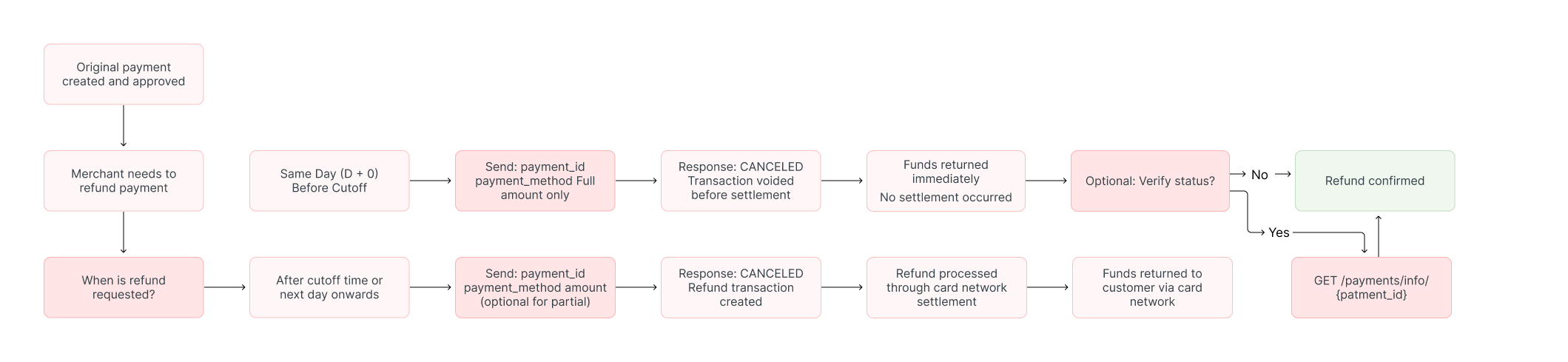
When a refund is processed on the same day as the original transaction, before the daily cutoff time, it’s processed as a cancellation. The transaction is voided before it enters the network settlement flow.
Characteristics:
- Only full refunds are allowed (partial refunds not supported)
- Transaction is voided before settlement
- Faster processing as the funds never leave the customer’s account
Transactions authorized very close to the cutoff time may require 20 to 30 minutes for full confirmation. In such cases, make the cancellation request after the cutoff time has passed to ensure it’s properly processed.
For country-specific cutoff times and availability, see the Core Cards reference.
Next-Day Refunds (D+1 or Later)
When a refund is processed on the day following the original transaction or later, after the daily cutoff time, it’s processed as a refund/adjustment. At this point, the transaction has already been sent through the card network’s settlement flow.
Characteristics:
- Both full and partial refunds are allowed (subject to country availability)
- Processed as a separate refund transaction through the settlement system
- May take longer to reflect in the customer’s account
For country-specific information about partial refund availability, see the Core Cards reference.
The diagram below illustrates the refund flow, showing the different paths for same-day cancellations versus next-day refunds:
Refund Payment Process
This section guides you through the process of refunding a payment transaction.
Required fields
| Field | Type | Description | Example |
|---|---|---|---|
idempotency_key | String | Unique identifier to prevent duplicate operations. | 63c7f8ee-51a6-470d-bb76-ef762b62bfb7 |
payment_id | String | The payment identifier from the original transaction response. | 2c341d28-491b-4cf8-aec7-eeb60136b7a5 |
payment_method | String | The payment method used in the original transaction. | CREDIT |
amount | Integer | Value (less than or equal) of the purchase in cents. | 118708 |
Partial Refunds: The
amountfield allows you to specify a partial refund amount (equal to or less than the original transaction). However, partial refunds are only available from D+1 onwards and availability varies by country. For country-specific information, see the Core Cards reference.
Step 1: Request the Refund or Cancellation
Despite the endpoint name, this endpoint handles both same-day cancellations and next-day refunds automatically based on the timing.
To process a refund or cancellation, use the Cancel Payment endpoint.
| Endpoint |
|---|
POST /cancel |
Example of Full refund request:
curl https://api.globalgetnet.com/dpm/payments-gwproxy/v2/payments/cancel \
  --request POST \
  --header 'Content-Type: application/json' \
  --header 'Authorization: Bearer YOUR_SECRET_TOKEN' \
  --data '{
  "idempotency_key": "a1b2c3d4-e5f6-4789-abcd-ef1234567890",
  "payment_id": "053de7f9-3725-437b-bdfc-bbf3ed0acb75",
  "payment_method": "CREDIT"
}'Example of Partial refund request:
(only available D+1 or later, subject to country availability):
curl https://api.globalgetnet.com/dpm/payments-gwproxy/v2/payments/cancel \
  --request POST \
  --header 'Content-Type: application/json' \
  --header 'Authorization: Bearer YOUR_SECRET_TOKEN' \
  --data '{
  "idempotency_key": "b2c3d4e5-f6a7-5890-bcde-fg2345678901",
  "payment_id": "053de7f9-3725-437b-bdfc-bbf3ed0acb75",
  "payment_method": "CREDIT",
  "amount": 50000
}'Example of Successful response:
{
  "idempotency_key": "a1b2c3d4-e5f6-4789-abcd-ef1234567890",
  "seller_id": "e0ed6f00-fdc5-46d6-9557-6a2cac641b09",
  "payment_id": "053de7f9-3725-437b-bdfc-bbf3ed0acb75",
  "order_id": "ORDER-10187383",
  "amount": 118708,
  "currency": "BRL",
  "status": "CANCELED",
  "reason_code": "00",
  "reason_message": "Cancellation successful",
  "canceled_at": "2025-10-31T14:30:25.166Z"
}Example of Denied response:
{
  "idempotency_key": "a1b2c3d4-e5f6-4789-abcd-ef1234567890",
  "seller_id": "e0ed6f00-fdc5-46d6-9557-6a2cac641b09",
  "payment_id": "053de7f9-3725-437b-bdfc-bbf3ed0acb75",
  "order_id": "ORDER-10187383",
  "amount": 118708,
  "currency": "BRL",
  "status": "DENIED",
  "reason_code": "05",
  "reason_message": "Cancellation not allowed - transaction already settled"
}Step 2: Verify the Refund Status
To confirm that the refund was successfully processed, check the status field in the response:
CANCELED: The refund was successfully processedDENIED: The refund was rejected
If the refund was denied, check the reason_code and reason_message fields for more details about why the refund failed.
You can also query the transaction status at any time using the Get Transaction endpoint. For real-time updates, it is recommended to use Webhooks to receive notifications for every status change.
Refunding Combined Payments
Combined payments require special handling when processing refunds:
Card Transactions
- Cancellation is available for confirmed transactions made more than 1 day ago.
Credit Cards
- Combined payments with credit cards can be cancelled through a request that includes the same number of payment objects as sent in the previous authorization request.
- Depending on the authorization status of the current transaction, cancellation can be reversed on the same day (already confirmed) or within 7 days.
To cancel a combined payment, use the Combined Payments - Cancel endpoint instead of the regular cancel endpoint.
Best Practices
When processing refunds, follow these best practices:
- Be aware of the daily cutoff times for your market to understand whether your refund will be processed as a same-day cancellation or next-day refund.
- Remember that partial refunds are only available from D+1 onwards and availability varies by country. Check the Core Cards reference for country-specific information.
- Always use a unique
idempotency_keyfor each refund request to prevent accidental duplicate refunds. - Use webhooks to receive real-time updates about refund processing rather than repeatedly polling the API.
- Keep the
payment_id,payment_method, andamountfrom the original transaction to facilitate refund processing.