# Zinia — Buy Now, Pay Later
 Zinia is a "Buy Now, Pay Later" (BNPL) payment method from Santander that allows customers to split their purchases into installments or pay later. This guide details how to integrate Zinia through the **Global API** utilizing the standard Alternative Payment Method (APM) redirect flow.
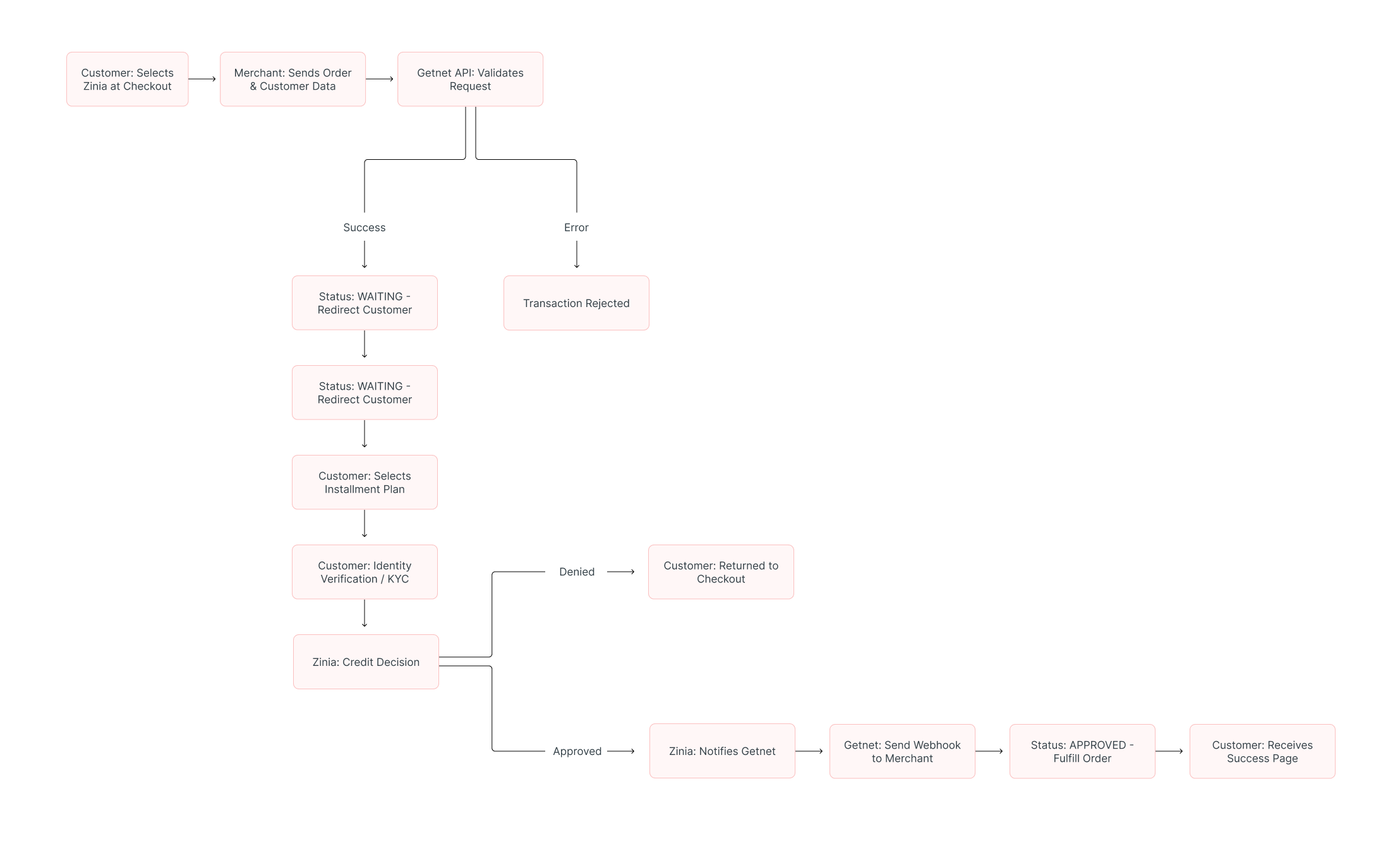
Unlike immediate payment methods, the initial response for a Zinia request returns a **`WAITING`** status. This indicates the request was successful, but the customer must be redirected to the Zinia portal to complete authorization.
## Requirements
Before integrating Zinia, ensure the following are configured:
- **Authentication:** A **Bearer Token** generated via the [Authentication endpoint](https://docs.globalgetnet.com/en/products/online-payments/regional-api/swagger#tag/authentication).
- **Webhook Listener:** You **must** have a public HTTPS endpoint (`callback_url`) ready to receive asynchronous notifications about the final payment status.
- **Seller Enablement:** Coordinate with your Account Manager to activate the Zinia brand for your seller account.
## Use Cases Specifics
When integrating any Getnet solution, market-specific requirements apply. Zinia is primarily available for European markets (e.g., Spain) and expects **EUR** currency.
- [Currency codes](https://docs.globalgetnet.com/en/articles?article=currency-codes)
- [Document types](https://docs.globalgetnet.com/en/articles?article=document-types)
- [Local taxes and regulations](https://docs.globalgetnet.com/en/articles?article=taxes-and-regulations)
## Characteristics
| Capability | Details |
| --- | --- |
| **Customer interaction** | Redirect to Zinia financing portal for installment selection and approval. |
| **Confirmation** | Asynchronous: initial `WAITING` status, then `APPROVED` or `DENIED` via webhook. |
| **Notifications** | Webhooks for real-time status updates after the customer completes the portal flow. |
## Available Features
Use the matrix below to confirm the scenarios currently supported for Zinia.
| Payment flow | Supported countries | Purchases | Refunds | Partial refunds | Pre-authorizations |
| --- | --- | --- | --- | --- | --- |
| Redirect | Europe (ES, DE, etc.) | ✅ | ✅ | ✅ | ❌ |
## Sandbox Simulation Guide
To successfully test and approve transactions in the sandbox environment, you must use specific "simulation triggers":
* **Customer Name:** The `customer.name` must include the string **`ZINIA_AP`** as the last name to trigger the sandbox engine's approval logic.
* **Transaction Amount:** Use an `amount` of **500 or higher** (e.g., `600` for €6.00). Values below 500 may be automatically declined by the test risk engine.
* **Identity Verification:** If the Zinia portal requests a document upload during the test, you may upload **any image file** to bypass this requirement.
## Integration Flow
### 1. Create the Payment Request
Call the [Create – Authorize endpoint](https://docs.globalgetnet.com/en/products/online-payments/regional-api/swagger#tag/payments/post/dpm/payments-gwproxy/v2/payments) with the attributes below. Detailed customer demographics and order items are strictly required for Zinia's risk modeling.
| Attribute | Description | Required Value |
| --- | --- | --- |
| `payment_method` | BNPL payment method | `BNPL` |
| `brand` | Brand identifier | `ZINIA` |
| `amount` | Transaction amount in cents | Integer (e.g., `600` for €6.00) |
| `currency` | ISO currency code | `EUR` |
| `order.items` | Array of items being purchased | **Mandatory** |
**Sample Request:**
```bash
curl --location --request POST 'https://api.pre.globalgetnet.com/dpm/payments-gwproxy/v2/payments' \
--header 'Content-Type: application/json' \
--header 'Authorization: Bearer ' \
--data-raw '{
"idempotency_key": "ed2851df-9c94-4229-8848-32043e84f9a1",
"request_id": "de311099-20b4-4d50-b3c6-08d90c52242c",
"order_id": "ttk9vnt8qwj7",
"data": {
"amount": 600,
"currency": "EUR",
"customer_id": "42412312523",
"payment": {
"payment_id": "ttk9vnt8qwj7",
"payment_method": "BNPL",
"brand": "ZINIA",
"soft_descriptor": "ZINIA TESTE"
},
"additional_data": {
"callback_url": "https://webhooksite/6ca8fe64-73e2-4400-a760-94c41e92ab43",
"customer": {
"email": "joedoe.doejoe@getnet.net",
"document_number": "50506468",
"document_type": "uyci",
"name": "Jose ZINIA_AP",
"phone_number": "34700000000",
"billing_address": {
"street": "R a",
"number": "1",
"district": "B",
"city": "City Z",
"state": "SP",
"country": "ES",
"postal_code": "05781000",
"complement": "N/A"
}
},
"order": {
"items": [
{
"name": "Item2",
"quantity": 1,
"sku": "sku1",
"price": 600
}
]
}
}
}
}'
```
### 2. Handling the Response and Redirection
The initial response returns a `status: WAITING`. You must redirect the customer to the financing portal using the data provided in the `additional_data._links` array.
**Sample Response:**
```json
{
"payment_id": "ttk9vnt8qwj7",
"status": "WAITING",
"reason_message": "Waiting payment flow.",
"additional_data": {
"signature": "c5LN2xXHUtardFVg...",
"_links": [
{
"rel": "apm_html",
"type": "POST",
"href": "https://sis-i.redsys.es:25443/sis/realizarPago"
}
],
"merchant_data": "eyJvcmRlcl9pZCI6...",
"signature_version": "T25V2"
}
}
```
To complete the flow, construct a form or fetch request using the following parameters:
- **Method:** Use the HTTP method specified in `type` (usually **POST**).
- **Endpoint:** Redirect to the `href` provided in the `apm_html` link.
- **Data:** You must include the `merchant_data`, `signature`, and `signature_version` in the redirect payload.
### 3. Verify Payment Status
After the customer completes the authorization flow at Zinia, they are returned to your site. Simultaneously, Getnet sends a notification to your `callback_url`.
| Status | Description | Next Action |
| --- | --- | --- |
| **WAITING** | Request successful; customer must authorize financing. | Redirect customer to Zinia portal. |
| **APPROVED** | Financing approved and payment captured. | Fulfill the order. |
| **DENIED** | The financing was rejected by the risk engine. | Display error and offer another payment method. |
You can also check the status manually using the [Get Transaction endpoint](https://docs.globalgetnet.com/en/products/online-payments/regional-api/swagger#tag/payment-record-management/get/dpm/hub-payment-info/v1/payments/info/%7Bpayment_id%7D).
## Read More
- Review [Authentication](/en/global-api/sep-api/first-steps-api/authentication) for token management.
- Explore [Webhooks](/en/global-api/webhooks-global/how-it-works) to handle asynchronous status notifications.
Zinia is a "Buy Now, Pay Later" (BNPL) payment method from Santander that allows customers to split their purchases into installments or pay later. This guide details how to integrate Zinia through the **Global API** utilizing the standard Alternative Payment Method (APM) redirect flow.
Unlike immediate payment methods, the initial response for a Zinia request returns a **`WAITING`** status. This indicates the request was successful, but the customer must be redirected to the Zinia portal to complete authorization.
## Requirements
Before integrating Zinia, ensure the following are configured:
- **Authentication:** A **Bearer Token** generated via the [Authentication endpoint](https://docs.globalgetnet.com/en/products/online-payments/regional-api/swagger#tag/authentication).
- **Webhook Listener:** You **must** have a public HTTPS endpoint (`callback_url`) ready to receive asynchronous notifications about the final payment status.
- **Seller Enablement:** Coordinate with your Account Manager to activate the Zinia brand for your seller account.
## Use Cases Specifics
When integrating any Getnet solution, market-specific requirements apply. Zinia is primarily available for European markets (e.g., Spain) and expects **EUR** currency.
- [Currency codes](https://docs.globalgetnet.com/en/articles?article=currency-codes)
- [Document types](https://docs.globalgetnet.com/en/articles?article=document-types)
- [Local taxes and regulations](https://docs.globalgetnet.com/en/articles?article=taxes-and-regulations)
## Characteristics
| Capability | Details |
| --- | --- |
| **Customer interaction** | Redirect to Zinia financing portal for installment selection and approval. |
| **Confirmation** | Asynchronous: initial `WAITING` status, then `APPROVED` or `DENIED` via webhook. |
| **Notifications** | Webhooks for real-time status updates after the customer completes the portal flow. |
## Available Features
Use the matrix below to confirm the scenarios currently supported for Zinia.
| Payment flow | Supported countries | Purchases | Refunds | Partial refunds | Pre-authorizations |
| --- | --- | --- | --- | --- | --- |
| Redirect | Europe (ES, DE, etc.) | ✅ | ✅ | ✅ | ❌ |
## Sandbox Simulation Guide
To successfully test and approve transactions in the sandbox environment, you must use specific "simulation triggers":
* **Customer Name:** The `customer.name` must include the string **`ZINIA_AP`** as the last name to trigger the sandbox engine's approval logic.
* **Transaction Amount:** Use an `amount` of **500 or higher** (e.g., `600` for €6.00). Values below 500 may be automatically declined by the test risk engine.
* **Identity Verification:** If the Zinia portal requests a document upload during the test, you may upload **any image file** to bypass this requirement.
## Integration Flow

### 1. Create the Payment Request
Call the [Create – Authorize endpoint](https://docs.globalgetnet.com/en/products/online-payments/regional-api/swagger#tag/payments/post/dpm/payments-gwproxy/v2/payments) with the attributes below. Detailed customer demographics and order items are strictly required for Zinia's risk modeling.
| Attribute | Description | Required Value |
| --- | --- | --- |
| `payment_method` | BNPL payment method | `BNPL` |
| `brand` | Brand identifier | `ZINIA` |
| `amount` | Transaction amount in cents | Integer (e.g., `600` for €6.00) |
| `currency` | ISO currency code | `EUR` |
| `order.items` | Array of items being purchased | **Mandatory** |
**Sample Request:**
```bash
curl --location --request POST 'https://api.pre.globalgetnet.com/dpm/payments-gwproxy/v2/payments' \
--header 'Content-Type: application/json' \
--header 'Authorization: Bearer ' \
--data-raw '{
"idempotency_key": "ed2851df-9c94-4229-8848-32043e84f9a1",
"request_id": "de311099-20b4-4d50-b3c6-08d90c52242c",
"order_id": "ttk9vnt8qwj7",
"data": {
"amount": 600,
"currency": "EUR",
"customer_id": "42412312523",
"payment": {
"payment_id": "ttk9vnt8qwj7",
"payment_method": "BNPL",
"brand": "ZINIA",
"soft_descriptor": "ZINIA TESTE"
},
"additional_data": {
"callback_url": "https://webhooksite/6ca8fe64-73e2-4400-a760-94c41e92ab43",
"customer": {
"email": "joedoe.doejoe@getnet.net",
"document_number": "50506468",
"document_type": "uyci",
"name": "Jose ZINIA_AP",
"phone_number": "34700000000",
"billing_address": {
"street": "R a",
"number": "1",
"district": "B",
"city": "City Z",
"state": "SP",
"country": "ES",
"postal_code": "05781000",
"complement": "N/A"
}
},
"order": {
"items": [
{
"name": "Item2",
"quantity": 1,
"sku": "sku1",
"price": 600
}
]
}
}
}
}'
```
### 2. Handling the Response and Redirection
The initial response returns a `status: WAITING`. You must redirect the customer to the financing portal using the data provided in the `additional_data._links` array.
**Sample Response:**
```json
{
"payment_id": "ttk9vnt8qwj7",
"status": "WAITING",
"reason_message": "Waiting payment flow.",
"additional_data": {
"signature": "c5LN2xXHUtardFVg...",
"_links": [
{
"rel": "apm_html",
"type": "POST",
"href": "https://sis-i.redsys.es:25443/sis/realizarPago"
}
],
"merchant_data": "eyJvcmRlcl9pZCI6...",
"signature_version": "T25V2"
}
}
```
To complete the flow, construct a form or fetch request using the following parameters:
- **Method:** Use the HTTP method specified in `type` (usually **POST**).
- **Endpoint:** Redirect to the `href` provided in the `apm_html` link.
- **Data:** You must include the `merchant_data`, `signature`, and `signature_version` in the redirect payload.
### 3. Verify Payment Status
After the customer completes the authorization flow at Zinia, they are returned to your site. Simultaneously, Getnet sends a notification to your `callback_url`.
| Status | Description | Next Action |
| --- | --- | --- |
| **WAITING** | Request successful; customer must authorize financing. | Redirect customer to Zinia portal. |
| **APPROVED** | Financing approved and payment captured. | Fulfill the order. |
| **DENIED** | The financing was rejected by the risk engine. | Display error and offer another payment method. |
You can also check the status manually using the [Get Transaction endpoint](https://docs.globalgetnet.com/en/products/online-payments/regional-api/swagger#tag/payment-record-management/get/dpm/hub-payment-info/v1/payments/info/%7Bpayment_id%7D).
## Read More
- Review [Authentication](/en/global-api/sep-api/first-steps-api/authentication) for token management.
- Explore [Webhooks](/en/global-api/webhooks-global/how-it-works) to handle asynchronous status notifications.