

Authenticate with OAuth2
To call the Getnet SEP API on behalf of a merchant, your integration must authenticate using OAuth2. Getnet uses the Authorization Code flow. Merchants authorize your integration directly through the Getnet portal, so your application never handles their credentials. Once authorized, you receive an access token that identifies your integration and the merchant’s store. Use it as a Bearer token on every API request you make on their behalf.
When to use this flow
Use this flow when your application acts on behalf of merchants, not on its own account. Getnet recommends it for three types of partners:
- Payment gateway partners — You provide payment infrastructure that multiple merchants use to process transactions.
- Ecommerce platforms — You run a platform and merchants accept payments through it.
- Partners managing multiple merchants — You operate multiple stores under one integration and route each transaction to the correct store independently.
One OAuth2 credential covers every merchant you onboard.
How it works
Getnet uses the OAuth2 Authorization Code flow for partner authentication. Getnet issues the credential per partner — not per merchant store — so a single credential covers all the stores you manage.
The flow has three phases:
- Merchant consent — you redirect the merchant to the Getnet portal. They log in and authorize your integration to transact on their behalf.
- Token exchange — your callback URL receives an authorization code, which you exchange for an access token and a refresh token.
- API access — you use the access token as a Bearer token to call the SEP API. The token carries the merchant’s
sellerIdandcountry, identifying which store the transaction belongs to.
The diagram below shows the complete flow in a technical point of view:
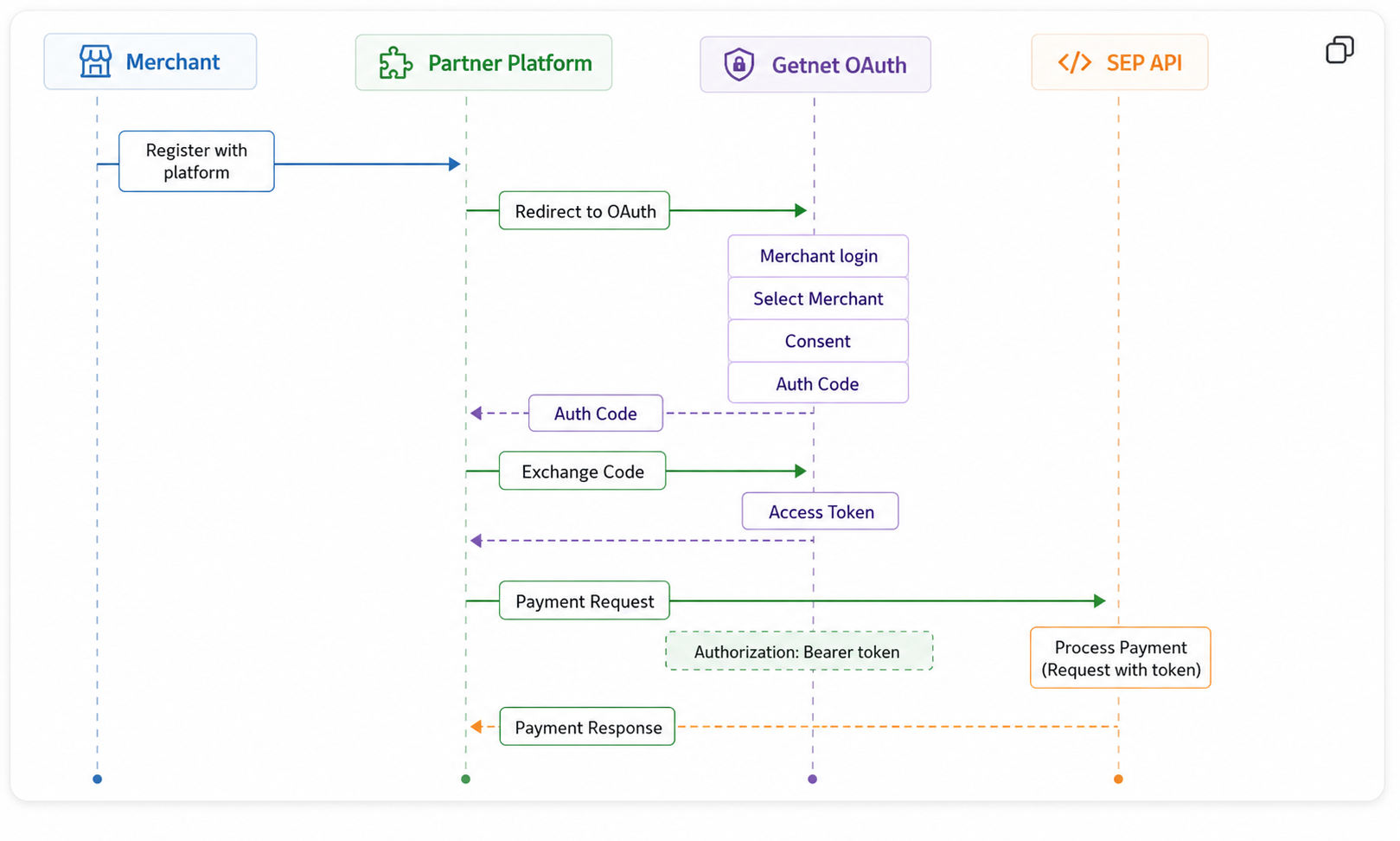
At the end of this guide, you will have a valid access token and refresh token for a merchant. You will also know how to keep them current.
Before you begin
Make sure you have the following before you start.
- Request your OAuth2 credential from the Getnet team. They will issue a
Client IDand register yourCallback URL. You do not receive a Client Secret — the credential uses the Public Client type. - Have your
Callback URLready before requesting the credential. Getnet registers it at creation time and it cannot be changed without issuing a new credential. - Your application must be able to receive a
GETrequest on the Callback URL and extract thecodequery parameter.
Step 1: Redirect the merchant for authorization
The merchant must already be registered on your platform before you start this flow. Once they are, redirect them to the Getnet authorization endpoint. They will log in and grant your integration access to transact on their behalf.
Send a GET request to the authorization endpoint.
GET https://www.globalgetnet.com/oauth2/authorize?prompt=login&max_age=0Include the following query parameters in the request URL.
| Parameter | Value | Description |
|---|---|---|
prompt | login | Forces the merchant to authenticate, even if already logged in. |
max_age | 0 | Prevents the use of cached sessions. |
client_id | Your Client ID | Identifies your credential. |
redirect_uri | Your Callback URL | Where Getnet sends the authorization code after consent. |
response_type | code | Requests an authorization code. |
scope | openid profile email sellerSelector digital-platform:gateway-api | Request all required scopes. |
Request all five scopes in the scope parameter. Each serves a different purpose in the authorization flow.
| Scope | Purpose |
|---|---|
openid | Standard OpenID Connect scope. |
profile | Merchant profile information. |
email | Merchant email address. |
sellerSelector | Allows the merchant to select which store to authorize. |
digital-platform:gateway-api | Access to the Getnet SEP API. Required for all transactions. |
The scope you use for SEP API calls is
digital-platform:gateway-api. You must include the other scopes during authorization, but you do not send them with API requests.
Step 2: Exchange the authorization code for an access token
After the merchant grants consent, Getnet redirects them to your Callback URL with a code parameter. Exchange that code for an access token.
Send a POST request to the token endpoint.
POST https://www.globalgetnet.com/oauth2/access_tokenSend the following as application/x-www-form-urlencoded:
| Field | Value |
|---|---|
grant_type | authorization_code |
code | The authorization code from your Callback URL |
redirect_uri | Your Callback URL (must match exactly) |
client_id | Your Client ID |
A successful response returns a JSON object containing the access token and refresh token. The access token is a JWT. Example payload:
{
  "sub": "xxxxxxxx-xxxx-xxxx-xxxx-xxxxxxxxxxxx",
  "cts": "OAUTH2_STATELESS_GRANT",
  "auth_level": 0,
  "auditTrackingId": "xxxxxxxx-xxxx-xxxx-xxxx-xxxxxxxxxxxx-xxxxxx",
  "subname": "xxxxxxxx-xxxx-xxxx-xxxx-xxxxxxxxxxxx",
  "iss": "https://www.globalgetnet.com/oauth2",
  "tokenName": "access_token",
  "token_type": "Bearer",
  "authGrantId": "************************",
  "aud": "<partner-audience>",
  "nbf": 1781030249,
  "grant_type": "authorization_code",
  "scope": [
    "digital-platform:gateway-api",
    "openid",
    "profile",
    "sellerSelector",
    "email"
  ],
  "auth_time": 1781030247,
  "realm": "/customer",
  "exp": 1781033849,
  "iat": 1781030249,
  "expires_in": 3600,
  "jti": "************************",
  "sellerId": "xxxxxxxx-xxxx-xxxx-xxxx-xxxxxxxxxxxx",
  "country": "AR",
  "userName": "***********",
  "tenant": "santander"
}The
audfield value is specific to each partner credential. Getnet provides it when they issue your Client ID.
The fields you must read and store:
| Field | Description |
|---|---|
sellerId | The merchant store identifier. Use this to route transactions. |
country | The merchant store’s country. |
tenant | Client tenant (typically santander). |
scope | The scopes granted. |
expires_in | Token lifetime in seconds (3600 = 1 hour). |
Store the sellerId — you need it to associate transactions with the correct store.
Step 3: Call the SEP API
Use the access token as a Bearer token on all SEP API requests for that merchant.
Authorization: Bearer <access_token>The token already contains the sellerId and country that identify which store the transaction belongs to.
Manage token expiration
The access token expires after 1 day. The refresh token, on the other hand, is valid for 7 days. Use the refresh token to get a new access token without requiring the merchant to re-authorize.
Configuration summary
The table below lists all OAuth2 configuration values for the UAT environment.
| Property | Value |
|---|---|
| Environment | Production |
| OAuth type | Authorization Code |
| Client type | Public |
| Client Secret | Not used |
| Authorization URL | https://www.globalgetnet.com/oauth2/authorize?prompt=login&max_age=0 |
| Access Token URL | https://www.globalgetnet.com/oauth2/access_token |
| Scopes | openid profile email sellerSelector digital-platform:gateway-api |
| SEP API scope | digital-platform:gateway-api |
| Required token fields | tenant, country, sellerId |
Test it
Use the UAT environment to test the full authorization flow before moving to production.
To test, you need a UAT credential issued by the Getnet team. Contact your Getnet integration contact to request one. They will also provide test merchant credentials for the authorization step.