# Create a 3DS Authenticated Payment with Third-Party Provider
This guide walks you through creating a 3D Secure (3DS) authenticated payment using an external third-party 3DS solution. When using this approach, authentication is performed by your third-party provider, and you must provide the resulting authentication data when creating the payment through GetNet's Global API.
## Requirements
Before following the steps, you need to:
* Create your account by contacting the Integration Support Team to get your API credentials (`client_id` and `client_secret`).
* Generate your Bearer token with your credentials using the Access Token endpoint.
* Have an active integration with a third-party 3DS provider (e.g., Cardinal Commerce, Adyen, Stripe, etc.).
* Ensure your third-party provider supports the card brands and countries you operate in.
> **Important for European transactions**: For all transactions within the European Economic Area (EEA), 3DS authentication is **mandatory** in compliance with PSD2 and Strong Customer Authentication (SCA) requirements. All card payments processed in Europe must be authenticated using 3DS, unless a valid SCA exemption is applied and accepted by the card issuer. For more information about SCA exemptions, see the Taxes and Regulations reference documentation.
> **Payment facilitators**: When Getnet enables your credential as a payment facilitator, you must also send the `data.sub_merchant` object when you create the payment. See [Payment Facilitators](/en/global-api/reference-global/payment-facilitators).
## Understanding Third-Party 3DS Authentication
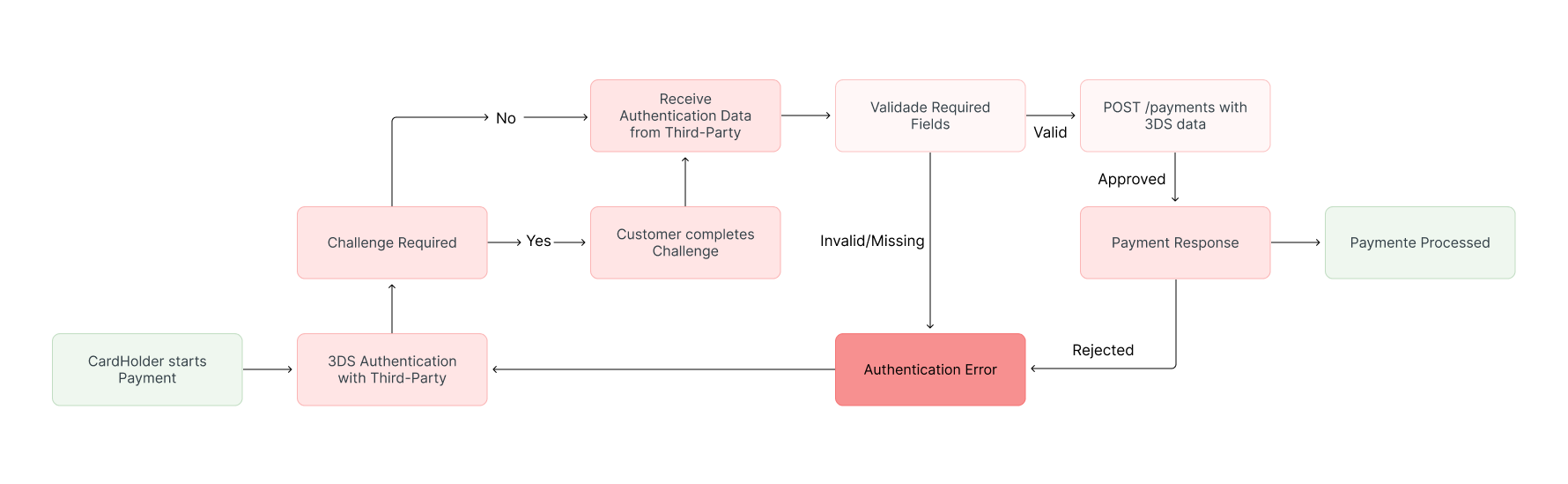
When using an external third-party 3DS solution, the authentication flow is handled entirely by your third-party provider. The process works as follows:
1. The customer completes authentication through your third-party 3DS provider.
2. You receive authentication response data from the third-party provider.
3. You include this authentication data when creating the payment through GetNet's payment API.
This approach allows you to use your existing 3DS infrastructure while still processing payments through GetNet.
The following diagram illustrates the simplified authentication flow:
 ### When to Use Third-Party 3DS
Consider using a third-party 3DS solution if:
* You already have an existing 3DS integration with another provider
* You need to maintain consistency across multiple payment processors
* Your third-party provider offers additional fraud prevention features you want to leverage
* You require specific 3DS features or configurations not available in GetNet's native solution
If you're starting fresh or don't have an existing third-party integration, consider using [GetNet's native 3DS solution](/en/global-api/sep-api/payment-guides-api/card-payments/3ds-guide) for a more streamlined integration experience.
## Required Authentication Fields
When using external 3DS authentication, you must capture and provide the following fields from your third-party provider:
| Field | Description | Required | Protocol Version |
| :----------- | :------------------------------------------------------------------------------------------------------- | :---------: | :--------------: |
| **tdsver** | The 3DS protocol version used in the authentication (e.g., "1.0.2" or "2.2.0") | Yes | Both |
| **eci** | *Electronic Commerce Indicator* - a code indicating the authentication outcome and level | Yes | Both |
| **xid** | A unique transaction identifier generated in the 3DS flow, linking the authentication to the payment | Yes | 3DS 1.0 only |
| **ucaf** | *Universal Cardholder Authentication Field* - a cryptographic value proving authentication was completed | Conditional | 3DS 1.0 only |
| **tdsdsxid** | A transaction identifier generated by 3DS 2.x protocol (equivalent to `ds_trans_id`) | Yes | 3DS 2.x only |
| **cavv** | *Cardholder Authentication Verification Value* - cryptographic proof of authentication | Conditional | 3DS 2.x only |
The exact fields required may vary depending on the 3DS protocol version (1.0 or 2.x) and your third-party provider. Consult your provider's documentation for the specific fields they return and their exact field names.
## Implementation Steps
### Step 1: Complete Authentication with Third-Party Provider
Follow your third-party 3DS provider's integration guide to complete the authentication flow. This typically involves:
1. Initiating the authentication request with your provider
2. Redirecting the customer to complete authentication (if challenge is required)
3. Receiving the authentication response with the required fields
The exact steps depend on your third-party provider's API and SDK. Refer to their documentation for specific implementation details.
### Step 2: Extract Authentication Data
After authentication is complete, extract the required authentication fields from your third-party provider's response. Ensure you capture all the fields listed in the [Required Authentication Fields](/en/global-api/sep-api/payment-guides-api/card-payments/3ds-third-party-guide#required-authentication-fields) section above.
The exact field names and structure depend on your third-party provider's API. Refer to your provider's documentation to identify where each required field is located in their response.
### Step 3: Create the Payment with Authentication Data
Once you have extracted the authentication data from your third-party provider, create the payment through GetNet's API by including the authentication fields in your payment request.
Call the [Create - Authorize](https://docs.globalgetnet.com/en/products/online-payments/regional-api/swagger#tag/payments/post/dpm/payments-gwproxy/v2/payments) endpoint, including:
* Standard payment details (amount, currency, customer, card information)
* The 3DS authentication data obtained from your third-party provider
**Request example with 3DS 2.x data:**
```bash
curl --request POST \
--url https://api-sbx.globalgetnet.com/dpm/payments-gwproxy/v2/payments \
--header 'authorization: Bearer ' \
--header 'content-type: application/json' \
--header 'x-seller-id: 54f88e68-7764-4e87-8830-756b1e2c02f8' \
--header 'x-transaction-channel-entry: XX' \
--data '{
"idempotency_key": "16c7f8ee-51a6-470d-bb76-ef762b62bfb7",
"request_id": "16ac03dc-73db-453f-9bea-b1391669d5d3",
"order_id": "ORDER-12345",
"data": {
"amount": 118708,
"currency": "EUR",
"customer_id": "customer-123",
"payment": {
"payment_method": "CREDIT",
"save_card_data": false,
"transaction_type": "FULL",
"number_installments": 1,
"tdsver": "2.2.0",
"eci": "05",
"tdsdsxid": "f7e5f76e-6388-43e6-b8cd-49b251a1f89c",
"cavv": "aglgsCXwXPJDRA1aTlXIMVQnQakX",
"card": {
"expiration_month": "05",
"expiration_year": "25",
"cardholder_name": "CARD HOLDER",
"security_code": "282",
"number_token": "775c2b646c11d5e0d0d75a722c558a14d24abdb1df3752fcbbe2d61e51fc25f28d028b3139622a78fb03256e7701c35f64cc4920bb2d5f3224c86f42e131a9f9"
}
}
}
}'
```
**Request example with 3DS 1.0 data:**
```bash
curl --request POST \
--url https://api-sbx.globalgetnet.com/dpm/payments-gwproxy/v2/payments \
--header 'authorization: Bearer ' \
--header 'content-type: application/json' \
--header 'x-seller-id: 54f88e68-7764-4e87-8830-756b1e2c02f8' \
--header 'x-transaction-channel-entry: XX' \
--data '{
"idempotency_key": "16c7f8ee-51a6-470d-bb76-ef762b62bfb7",
"request_id": "16ac03dc-73db-453f-9bea-b1391669d5d3",
"order_id": "ORDER-12345",
"data": {
"amount": 118708,
"currency": "EUR",
"customer_id": "customer-123",
"payment": {
"payment_method": "CREDIT",
"save_card_data": false,
"transaction_type": "FULL",
"number_installments": 1,
"tdsver": "1.0.2",
"xid": "VDdnR0kyU1g4ZXlxMkhWTlp0VnA=",
"eci": "05",
"ucaf": "Y2F2dlZhbHVlSW5IZXg=",
"card": {
"expiration_month": "05",
"expiration_year": "25",
"cardholder_name": "CARD HOLDER",
"security_code": "282",
"number_token": "775c2b646c11d5e0d0d75a722c558a14d24abdb1df3752fcbbe2d61e51fc25f28d028b3139622a78fb03256e7701c35f64cc4920bb2d5f3224c86f42e131a9f9"
}
}
}
}'
```
**Response example:**
```json
{
"idempotency_key": "16c7f8ee-51a6-470d-bb76-ef762b62bfb7",
"seller_id": "54f88e68-7764-4e87-8830-756b1e2c02f8",
"payment_id": "b4bd779a-98c3-4f99-a028-518de149ed16",
"order_id": "ORDER-12345",
"amount": 118708,
"currency": "EUR",
"status": "APPROVED",
"payment_method": "CREDIT",
"received_at": "2025-08-13T10:34:01.239Z",
"transaction_id": "MCC50204G3010",
"original_transaction_id": "MCC50204G3010",
"authorized_at": "2025-08-13T10:34:01.239Z",
"reason_code": "00",
"reason_message": "captured",
"acquirer": "GETNET",
"brand": "MASTERCARD",
"authorization_code": "105020",
"acquirer_transaction_id": "305020602020306050404010"
}
```
## Important Considerations
When using external 3DS authentication, keep the following in mind:
* **Data integrity**: Ensure data integrity and authenticity of authentication data received from the third-party provider before sending it to GetNet.
* **Field validation**: Transactions may be rejected by the issuer if authentication fields are missing or invalid. Always verify that all required fields are present and correctly formatted.
* **Provider compatibility**: The external provider must support the card brands and countries you operate in. Verify compatibility before implementing.
* **Error handling**: Implement proper error handling for cases where authentication fails or required fields are missing.
## Next Steps
Now that you have successfully created a 3DS-authenticated payment using a third-party provider, you can explore more features of the GetNet Global API:
* Learn about [3DS Authentication with GetNet](/en/global-api/sep-api/payment-guides-api/card-payments/3ds-guide) if you want to use GetNet's native 3DS solution.
* Review the [3DS Authentication concepts](/en/global-api/sep-api/core-concepts-api/3dsecure) for more information about how 3DS works.
### When to Use Third-Party 3DS
Consider using a third-party 3DS solution if:
* You already have an existing 3DS integration with another provider
* You need to maintain consistency across multiple payment processors
* Your third-party provider offers additional fraud prevention features you want to leverage
* You require specific 3DS features or configurations not available in GetNet's native solution
If you're starting fresh or don't have an existing third-party integration, consider using [GetNet's native 3DS solution](/en/global-api/sep-api/payment-guides-api/card-payments/3ds-guide) for a more streamlined integration experience.
## Required Authentication Fields
When using external 3DS authentication, you must capture and provide the following fields from your third-party provider:
| Field | Description | Required | Protocol Version |
| :----------- | :------------------------------------------------------------------------------------------------------- | :---------: | :--------------: |
| **tdsver** | The 3DS protocol version used in the authentication (e.g., "1.0.2" or "2.2.0") | Yes | Both |
| **eci** | *Electronic Commerce Indicator* - a code indicating the authentication outcome and level | Yes | Both |
| **xid** | A unique transaction identifier generated in the 3DS flow, linking the authentication to the payment | Yes | 3DS 1.0 only |
| **ucaf** | *Universal Cardholder Authentication Field* - a cryptographic value proving authentication was completed | Conditional | 3DS 1.0 only |
| **tdsdsxid** | A transaction identifier generated by 3DS 2.x protocol (equivalent to `ds_trans_id`) | Yes | 3DS 2.x only |
| **cavv** | *Cardholder Authentication Verification Value* - cryptographic proof of authentication | Conditional | 3DS 2.x only |
The exact fields required may vary depending on the 3DS protocol version (1.0 or 2.x) and your third-party provider. Consult your provider's documentation for the specific fields they return and their exact field names.
## Implementation Steps
### Step 1: Complete Authentication with Third-Party Provider
Follow your third-party 3DS provider's integration guide to complete the authentication flow. This typically involves:
1. Initiating the authentication request with your provider
2. Redirecting the customer to complete authentication (if challenge is required)
3. Receiving the authentication response with the required fields
The exact steps depend on your third-party provider's API and SDK. Refer to their documentation for specific implementation details.
### Step 2: Extract Authentication Data
After authentication is complete, extract the required authentication fields from your third-party provider's response. Ensure you capture all the fields listed in the [Required Authentication Fields](/en/global-api/sep-api/payment-guides-api/card-payments/3ds-third-party-guide#required-authentication-fields) section above.
The exact field names and structure depend on your third-party provider's API. Refer to your provider's documentation to identify where each required field is located in their response.
### Step 3: Create the Payment with Authentication Data
Once you have extracted the authentication data from your third-party provider, create the payment through GetNet's API by including the authentication fields in your payment request.
Call the [Create - Authorize](https://docs.globalgetnet.com/en/products/online-payments/regional-api/swagger#tag/payments/post/dpm/payments-gwproxy/v2/payments) endpoint, including:
* Standard payment details (amount, currency, customer, card information)
* The 3DS authentication data obtained from your third-party provider
**Request example with 3DS 2.x data:**
```bash
curl --request POST \
--url https://api-sbx.globalgetnet.com/dpm/payments-gwproxy/v2/payments \
--header 'authorization: Bearer ' \
--header 'content-type: application/json' \
--header 'x-seller-id: 54f88e68-7764-4e87-8830-756b1e2c02f8' \
--header 'x-transaction-channel-entry: XX' \
--data '{
"idempotency_key": "16c7f8ee-51a6-470d-bb76-ef762b62bfb7",
"request_id": "16ac03dc-73db-453f-9bea-b1391669d5d3",
"order_id": "ORDER-12345",
"data": {
"amount": 118708,
"currency": "EUR",
"customer_id": "customer-123",
"payment": {
"payment_method": "CREDIT",
"save_card_data": false,
"transaction_type": "FULL",
"number_installments": 1,
"tdsver": "2.2.0",
"eci": "05",
"tdsdsxid": "f7e5f76e-6388-43e6-b8cd-49b251a1f89c",
"cavv": "aglgsCXwXPJDRA1aTlXIMVQnQakX",
"card": {
"expiration_month": "05",
"expiration_year": "25",
"cardholder_name": "CARD HOLDER",
"security_code": "282",
"number_token": "775c2b646c11d5e0d0d75a722c558a14d24abdb1df3752fcbbe2d61e51fc25f28d028b3139622a78fb03256e7701c35f64cc4920bb2d5f3224c86f42e131a9f9"
}
}
}
}'
```
**Request example with 3DS 1.0 data:**
```bash
curl --request POST \
--url https://api-sbx.globalgetnet.com/dpm/payments-gwproxy/v2/payments \
--header 'authorization: Bearer ' \
--header 'content-type: application/json' \
--header 'x-seller-id: 54f88e68-7764-4e87-8830-756b1e2c02f8' \
--header 'x-transaction-channel-entry: XX' \
--data '{
"idempotency_key": "16c7f8ee-51a6-470d-bb76-ef762b62bfb7",
"request_id": "16ac03dc-73db-453f-9bea-b1391669d5d3",
"order_id": "ORDER-12345",
"data": {
"amount": 118708,
"currency": "EUR",
"customer_id": "customer-123",
"payment": {
"payment_method": "CREDIT",
"save_card_data": false,
"transaction_type": "FULL",
"number_installments": 1,
"tdsver": "1.0.2",
"xid": "VDdnR0kyU1g4ZXlxMkhWTlp0VnA=",
"eci": "05",
"ucaf": "Y2F2dlZhbHVlSW5IZXg=",
"card": {
"expiration_month": "05",
"expiration_year": "25",
"cardholder_name": "CARD HOLDER",
"security_code": "282",
"number_token": "775c2b646c11d5e0d0d75a722c558a14d24abdb1df3752fcbbe2d61e51fc25f28d028b3139622a78fb03256e7701c35f64cc4920bb2d5f3224c86f42e131a9f9"
}
}
}
}'
```
**Response example:**
```json
{
"idempotency_key": "16c7f8ee-51a6-470d-bb76-ef762b62bfb7",
"seller_id": "54f88e68-7764-4e87-8830-756b1e2c02f8",
"payment_id": "b4bd779a-98c3-4f99-a028-518de149ed16",
"order_id": "ORDER-12345",
"amount": 118708,
"currency": "EUR",
"status": "APPROVED",
"payment_method": "CREDIT",
"received_at": "2025-08-13T10:34:01.239Z",
"transaction_id": "MCC50204G3010",
"original_transaction_id": "MCC50204G3010",
"authorized_at": "2025-08-13T10:34:01.239Z",
"reason_code": "00",
"reason_message": "captured",
"acquirer": "GETNET",
"brand": "MASTERCARD",
"authorization_code": "105020",
"acquirer_transaction_id": "305020602020306050404010"
}
```
## Important Considerations
When using external 3DS authentication, keep the following in mind:
* **Data integrity**: Ensure data integrity and authenticity of authentication data received from the third-party provider before sending it to GetNet.
* **Field validation**: Transactions may be rejected by the issuer if authentication fields are missing or invalid. Always verify that all required fields are present and correctly formatted.
* **Provider compatibility**: The external provider must support the card brands and countries you operate in. Verify compatibility before implementing.
* **Error handling**: Implement proper error handling for cases where authentication fails or required fields are missing.
## Next Steps
Now that you have successfully created a 3DS-authenticated payment using a third-party provider, you can explore more features of the GetNet Global API:
* Learn about [3DS Authentication with GetNet](/en/global-api/sep-api/payment-guides-api/card-payments/3ds-guide) if you want to use GetNet's native 3DS solution.
* Review the [3DS Authentication concepts](/en/global-api/sep-api/core-concepts-api/3dsecure) for more information about how 3DS works.