# Nequi
 Nequi is a widely used digital wallet in Colombia. The API integration supports **Pay-ins** (collecting funds via QR Code or Push Notification) and **Payouts** (disbursing funds directly to a Nequi account). All flows are confirmed asynchronously via webhook.
#### Payment Methods Available
There are two primary ways for a customer to complete a payment with Nequi, determined by the `payment_method` field:
1. **Nequi QR (`WALLET`):** The API returns a `redirect_url`. The merchant can redirect the customer to this URL or render it as a QR code for the customer to scan using the Nequi app.
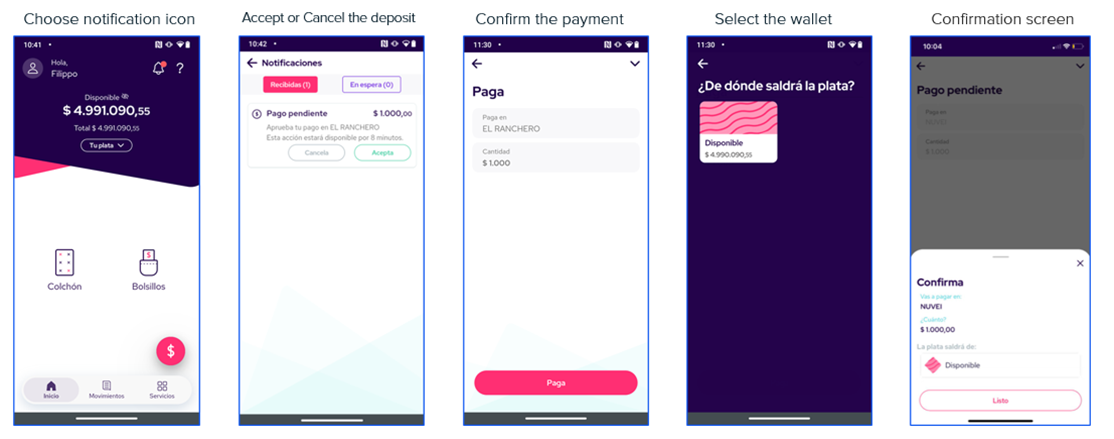
2. **Nequi Push (`WALLET_PUSH`):** The merchant triggers a push notification to the customer's phone number. The customer accepts the payment directly within the Nequi app.
## Requirements
Before integrating Nequi, you need to:
* Generate an access token through the [Authentication endpoint](https://docs.globalgetnet.com/en/products/online-payments/regional-api/swagger#tag/authentication).
* Configure a public HTTPS `callback_url` to receive asynchronous status updates when the customer completes or rejects the payment.
* Ensure that the merchant account is configured for Colombia (CO) and COP currency.
* **For Payouts:** Ensure your merchant account has sufficient balance to cover the disbursement amount.
## Use Cases Specifics
When integrating Nequi via Getnet, specific market requirements apply. Nequi is only available in **Colombia** and supports **COP** currency.
* [Currency codes](https://docs.globalgetnet.com/en/articles?article=currency-codes)
* [Document types](https://docs.globalgetnet.com/en/articles?article=document-types)
* [Local taxes and regulations](https://docs.globalgetnet.com/en/articles?article=taxes-and-regulations)
## Characteristics
The table below summarizes the behavior and requirements for Nequi payment flows.
| Capability | Details |
| :--------------------------- | :---------------------------------------------------------------------------------------------------------------------------------------------------- |
| **Customer experience** | **QR Flow:** Customer scans a code generated from the redirect URL.
Nequi is a widely used digital wallet in Colombia. The API integration supports **Pay-ins** (collecting funds via QR Code or Push Notification) and **Payouts** (disbursing funds directly to a Nequi account). All flows are confirmed asynchronously via webhook.
#### Payment Methods Available
There are two primary ways for a customer to complete a payment with Nequi, determined by the `payment_method` field:
1. **Nequi QR (`WALLET`):** The API returns a `redirect_url`. The merchant can redirect the customer to this URL or render it as a QR code for the customer to scan using the Nequi app.
2. **Nequi Push (`WALLET_PUSH`):** The merchant triggers a push notification to the customer's phone number. The customer accepts the payment directly within the Nequi app.
## Requirements
Before integrating Nequi, you need to:
* Generate an access token through the [Authentication endpoint](https://docs.globalgetnet.com/en/products/online-payments/regional-api/swagger#tag/authentication).
* Configure a public HTTPS `callback_url` to receive asynchronous status updates when the customer completes or rejects the payment.
* Ensure that the merchant account is configured for Colombia (CO) and COP currency.
* **For Payouts:** Ensure your merchant account has sufficient balance to cover the disbursement amount.
## Use Cases Specifics
When integrating Nequi via Getnet, specific market requirements apply. Nequi is only available in **Colombia** and supports **COP** currency.
* [Currency codes](https://docs.globalgetnet.com/en/articles?article=currency-codes)
* [Document types](https://docs.globalgetnet.com/en/articles?article=document-types)
* [Local taxes and regulations](https://docs.globalgetnet.com/en/articles?article=taxes-and-regulations)
## Characteristics
The table below summarizes the behavior and requirements for Nequi payment flows.
| Capability | Details |
| :--------------------------- | :---------------------------------------------------------------------------------------------------------------------------------------------------- |
| **Customer experience** | **QR Flow:** Customer scans a code generated from the redirect URL.
**Push Flow:** Customer receives a notification on their phone to approve. |
| **Confirmation** | Asynchronous — A webhook notification informs the merchant when the payment is approved or rejected. |
| **Idempotency & uniqueness** | Each request must include a unique `idempotency_key`. |
## Available features
Use the matrix below to confirm the scenarios currently supported for Nequi.
| Payment flow | Supported countries | Purchases | Refunds | Partial refunds | Pre-authorizations | Recurring payments | Payouts |
| :----------------: | :-----------------: | :-------: | :-----: | :-------------: | :----------------: | :----------------: | :-----: |
| Direct (QR / Push) | Colombia | ✅ | ✅ | ✅ | ❌ | ✅ | ✅ |
## Payment flow
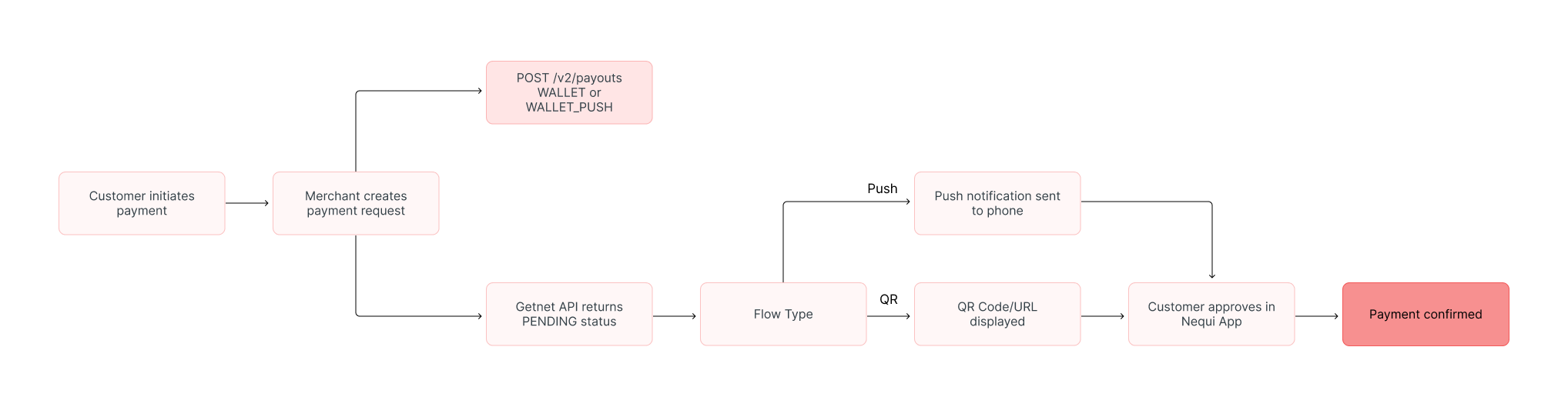
This section guides you through the complete process of implementing Nequi payments. The diagram below provides an overview of the Nequi payment process:
 ### 1. Create the payment request
To initiate a Nequi payment, call the [Create - Authorize endpoint](https://docs.globalgetnet.com/en/products/online-payments/regional-api/swagger#tag/payments/post/dpm/payments-gwproxy/v2/payments).
You must choose the flow by setting the `payment_method` and provide the customer's mobile phone number (critical for the Push flow).
The table outlines the minimum fields required for a Nequi payment.
| Attribute | Description | Required value |
| :---------------------- | :------------------------------------ | :------------------------------------------------------------------------ |
| `payment_method` | Defines the flow type | `WALLET` (for QR Code flow) or `WALLET_PUSH` (for Push Notification flow) |
| `brand` | Nequi brand identifier | `NEQUI` |
| `callback_url` | Where status updates are sent | Your HTTPS endpoint |
| `amount` | Transaction amount in cents | Integer (e.g. `10000` for \$100.00 COP) |
| `currency` | ISO currency code | `COP` |
| `order_id` | Merchant reference for reconciliation | Unique string (max 32 characters) |
| `customer.phone_number` | Customer's mobile number | String (e.g., `3001234567`) |
#### Nequi Push Notification
Use `WALLET_PUSH`. The customer receives a notification on their phone. No redirect URL is returned in the response.
The following sample request shows how to initialize a Nequi push notification payment.
```bash
curl --location --request POST '[https://api.pre.globalgetnet.com/dpm/payments-gwproxy/v2/payments](https://api.pre.globalgetnet.com/dpm/payments-gwproxy/v2/payments)' \
--header 'Content-Type: application/json' \
--header 'Authorization: Bearer ' \
--data-raw '{
"idempotency_key": "bcad559e-ae27-480c-86ff-fe6c17c762c3",
"request_id": "894d2718-3966-4df2-b9c2-1a7ddece28ff",
"order_id": "35541354322",
"data": {
"amount": 400,
"currency": "COP",
"customer_id": "47377104-827e-4143-b461-fdf768fb2903",
"payment": {
"payment_id": "42853760-f2a5-4dff-b4f2-a60689c19965",
"payment_method": "WALLET_PUSH",
"brand": "NEQUI",
"soft_descriptor": "NEQUI TESTE"
},
"additional_data": {
"callback_url": "https://localhost:8080/notification/fake/1",
"customer": {
"email": "stevan.viapiana@getnet.net",
"document_number": "50506468",
"document_type": "uyci",
"name": "Jose da Silva",
"phone_number": "34700000000",
"billing_address": {
"street": "R a",
"number": "1",
"district": "B",
"city": "City Z",
"state": "SP",
"country": "CO",
"postal_code": "05781000",
"complement": "N/A"
}
},
"order": {
"items": [
{
"name": "Item2",
"quantity": 1,
"sku": "sku1",
"price": 1022
}
]
}
}
}
}'
```
The API responds with a payload similar to the example below.
```json
{
"idempotency_key": "bcad559e-ae27-480c-86ff-fe6c17c762c3",
"seller_id": "your-seller-id",
"payment_id": "42853760-f2a5-4dff-b4f2-a60689c19965",
"order_id": "35541354322",
"amount": "400",
"currency": "COP",
"status": "PENDING",
"payment_method": "WALLET_PUSH",
"received_at": "2025-11-15T10:00:00.000Z",
"reason_code": "00",
"reason_message": "Waiting for customer approval in Nequi app."
}
```
#### Nequi QR Code
Use `WALLET`. The API returns a `redirect_url` which allows the merchant to generate a QR code.
The following sample request shows how to initialize a Nequi QR payment.
```bash
curl --location --request POST '[https://api.pre.globalgetnet.com/dpm/payments-gwproxy/v2/payments](https://api.pre.globalgetnet.com/dpm/payments-gwproxy/v2/payments)' \
--header 'Content-Type: application/json' \
--header 'Authorization: Bearer ' \
--data-raw '{
"idempotency_key": "qr-flow-unique-key-123",
"request_id": "qr-req-001",
"order_id": "35541354323",
"data": {
"amount": 400,
"currency": "COP",
"customer_id": "47377104-827e-4143-b461-fdf768fb2903",
"payment": {
"payment_id": "55853760-f2a5-4dff-b4f2-a60689c19966",
"payment_method": "WALLET",
"brand": "NEQUI",
"soft_descriptor": "NEQUI QR TEST"
},
"additional_data": {
"callback_url": "https://localhost:8080/notification/fake/1",
"customer": {
"email": "stevan.viapiana@getnet.net",
"document_number": "50506468",
"document_type": "uyci",
"name": "Jose da Silva",
"phone_number": "34700000000",
"billing_address": {
"street": "R a",
"number": "1",
"district": "B",
"city": "City Z",
"state": "SP",
"country": "CO",
"postal_code": "05781000",
"complement": "N/A"
}
}
}
}
}'
```
The API responds with a payload similar to the example below.
```json
{
"idempotency_key": "qr-flow-unique-key-123",
"seller_id": "your-seller-id",
"payment_id": "55853760-f2a5-4dff-b4f2-a60689c19966",
"order_id": "35541354323",
"amount": "400",
"currency": "COP",
"status": "PENDING",
"payment_method": "WALLET",
"received_at": "2025-11-15T10:05:00.000Z",
"reason_code": "00",
"reason_message": "Waiting for payment confirmation.",
"additional_data": {
"redirect_url": "[https://payment.nequi.com/qr/transaction-token-12345](https://payment.nequi.com/qr/transaction-token-12345)"
}
}
```
### 2. Customer Action
The customer action depends on the chosen flow:
#### QR Code
1. The user is redirected to a page on which a QR code appears.
### 1. Create the payment request
To initiate a Nequi payment, call the [Create - Authorize endpoint](https://docs.globalgetnet.com/en/products/online-payments/regional-api/swagger#tag/payments/post/dpm/payments-gwproxy/v2/payments).
You must choose the flow by setting the `payment_method` and provide the customer's mobile phone number (critical for the Push flow).
The table outlines the minimum fields required for a Nequi payment.
| Attribute | Description | Required value |
| :---------------------- | :------------------------------------ | :------------------------------------------------------------------------ |
| `payment_method` | Defines the flow type | `WALLET` (for QR Code flow) or `WALLET_PUSH` (for Push Notification flow) |
| `brand` | Nequi brand identifier | `NEQUI` |
| `callback_url` | Where status updates are sent | Your HTTPS endpoint |
| `amount` | Transaction amount in cents | Integer (e.g. `10000` for \$100.00 COP) |
| `currency` | ISO currency code | `COP` |
| `order_id` | Merchant reference for reconciliation | Unique string (max 32 characters) |
| `customer.phone_number` | Customer's mobile number | String (e.g., `3001234567`) |
#### Nequi Push Notification
Use `WALLET_PUSH`. The customer receives a notification on their phone. No redirect URL is returned in the response.
The following sample request shows how to initialize a Nequi push notification payment.
```bash
curl --location --request POST '[https://api.pre.globalgetnet.com/dpm/payments-gwproxy/v2/payments](https://api.pre.globalgetnet.com/dpm/payments-gwproxy/v2/payments)' \
--header 'Content-Type: application/json' \
--header 'Authorization: Bearer ' \
--data-raw '{
"idempotency_key": "bcad559e-ae27-480c-86ff-fe6c17c762c3",
"request_id": "894d2718-3966-4df2-b9c2-1a7ddece28ff",
"order_id": "35541354322",
"data": {
"amount": 400,
"currency": "COP",
"customer_id": "47377104-827e-4143-b461-fdf768fb2903",
"payment": {
"payment_id": "42853760-f2a5-4dff-b4f2-a60689c19965",
"payment_method": "WALLET_PUSH",
"brand": "NEQUI",
"soft_descriptor": "NEQUI TESTE"
},
"additional_data": {
"callback_url": "https://localhost:8080/notification/fake/1",
"customer": {
"email": "stevan.viapiana@getnet.net",
"document_number": "50506468",
"document_type": "uyci",
"name": "Jose da Silva",
"phone_number": "34700000000",
"billing_address": {
"street": "R a",
"number": "1",
"district": "B",
"city": "City Z",
"state": "SP",
"country": "CO",
"postal_code": "05781000",
"complement": "N/A"
}
},
"order": {
"items": [
{
"name": "Item2",
"quantity": 1,
"sku": "sku1",
"price": 1022
}
]
}
}
}
}'
```
The API responds with a payload similar to the example below.
```json
{
"idempotency_key": "bcad559e-ae27-480c-86ff-fe6c17c762c3",
"seller_id": "your-seller-id",
"payment_id": "42853760-f2a5-4dff-b4f2-a60689c19965",
"order_id": "35541354322",
"amount": "400",
"currency": "COP",
"status": "PENDING",
"payment_method": "WALLET_PUSH",
"received_at": "2025-11-15T10:00:00.000Z",
"reason_code": "00",
"reason_message": "Waiting for customer approval in Nequi app."
}
```
#### Nequi QR Code
Use `WALLET`. The API returns a `redirect_url` which allows the merchant to generate a QR code.
The following sample request shows how to initialize a Nequi QR payment.
```bash
curl --location --request POST '[https://api.pre.globalgetnet.com/dpm/payments-gwproxy/v2/payments](https://api.pre.globalgetnet.com/dpm/payments-gwproxy/v2/payments)' \
--header 'Content-Type: application/json' \
--header 'Authorization: Bearer ' \
--data-raw '{
"idempotency_key": "qr-flow-unique-key-123",
"request_id": "qr-req-001",
"order_id": "35541354323",
"data": {
"amount": 400,
"currency": "COP",
"customer_id": "47377104-827e-4143-b461-fdf768fb2903",
"payment": {
"payment_id": "55853760-f2a5-4dff-b4f2-a60689c19966",
"payment_method": "WALLET",
"brand": "NEQUI",
"soft_descriptor": "NEQUI QR TEST"
},
"additional_data": {
"callback_url": "https://localhost:8080/notification/fake/1",
"customer": {
"email": "stevan.viapiana@getnet.net",
"document_number": "50506468",
"document_type": "uyci",
"name": "Jose da Silva",
"phone_number": "34700000000",
"billing_address": {
"street": "R a",
"number": "1",
"district": "B",
"city": "City Z",
"state": "SP",
"country": "CO",
"postal_code": "05781000",
"complement": "N/A"
}
}
}
}
}'
```
The API responds with a payload similar to the example below.
```json
{
"idempotency_key": "qr-flow-unique-key-123",
"seller_id": "your-seller-id",
"payment_id": "55853760-f2a5-4dff-b4f2-a60689c19966",
"order_id": "35541354323",
"amount": "400",
"currency": "COP",
"status": "PENDING",
"payment_method": "WALLET",
"received_at": "2025-11-15T10:05:00.000Z",
"reason_code": "00",
"reason_message": "Waiting for payment confirmation.",
"additional_data": {
"redirect_url": "[https://payment.nequi.com/qr/transaction-token-12345](https://payment.nequi.com/qr/transaction-token-12345)"
}
}
```
### 2. Customer Action
The customer action depends on the chosen flow:
#### QR Code
1. The user is redirected to a page on which a QR code appears.
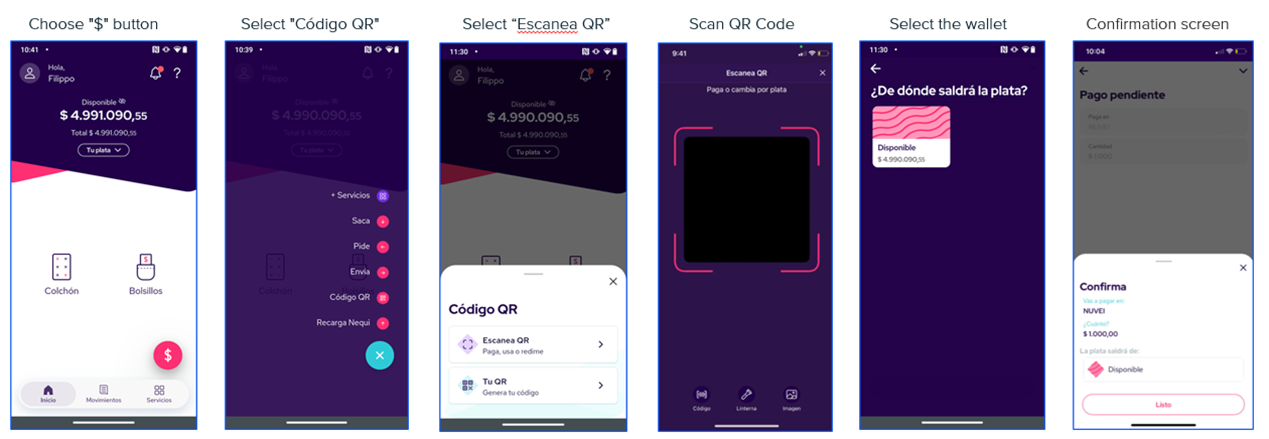
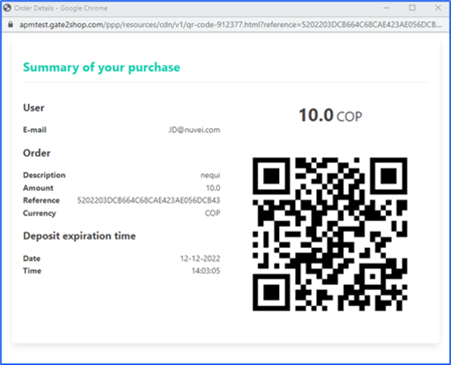 The user can either scan the QR using the Nequi mobile app or take a screenshot of the QR code and upload it to the app.
 #### Push Notification
The user receives a push notification in the Nequi mobile app.
#### Push Notification
The user receives a push notification in the Nequi mobile app.
 ### 3. Verify payment status
Once the customer approves the payment, a webhook notification is sent to your configured `callback_url` with the updated status (`APPROVED` or `REJECTED`).
You can also manually check the status using the [Get Transaction endpoint](https://docs.globalgetnet.com/en/products/online-payments/regional-api/swagger#tag/payment-record-management/get/dpm/hub-payment-info/v1/payments/info/{payment_id}).
## Payouts
The Nequi Payout solution allows merchants to disburse funds directly to a customer's Nequi digital wallet in Colombia. This is ideal for gig economy earnings, refunds, or gaming withdrawals.
The Getnet API simplifies the underlying process into a single request. You do not need to manually register the user or token; simply provide the customer's phone number and details in the payout request.
### Characteristics
The table below summarizes the behavior and requirements for Nequi Payouts.
| Capability | Details |
| :-------------------- | :-------------------------------------------------------------------------------------------------------------------------------------------- |
| **Transaction Type** | **Disbursement** (Merchant sends funds to Customer). |
| **Confirmation** | Asynchronous — A webhook notification informs the merchant when the funds have been successfully credited. |
| **Data Requirements** | **Phone Number:** Must be exactly **10 digits**.
### 3. Verify payment status
Once the customer approves the payment, a webhook notification is sent to your configured `callback_url` with the updated status (`APPROVED` or `REJECTED`).
You can also manually check the status using the [Get Transaction endpoint](https://docs.globalgetnet.com/en/products/online-payments/regional-api/swagger#tag/payment-record-management/get/dpm/hub-payment-info/v1/payments/info/{payment_id}).
## Payouts
The Nequi Payout solution allows merchants to disburse funds directly to a customer's Nequi digital wallet in Colombia. This is ideal for gig economy earnings, refunds, or gaming withdrawals.
The Getnet API simplifies the underlying process into a single request. You do not need to manually register the user or token; simply provide the customer's phone number and details in the payout request.
### Characteristics
The table below summarizes the behavior and requirements for Nequi Payouts.
| Capability | Details |
| :-------------------- | :-------------------------------------------------------------------------------------------------------------------------------------------- |
| **Transaction Type** | **Disbursement** (Merchant sends funds to Customer). |
| **Confirmation** | Asynchronous — A webhook notification informs the merchant when the funds have been successfully credited. |
| **Data Requirements** | **Phone Number:** Must be exactly **10 digits**.
**Customer Details:** First and Last name are required for the provider registration. |
### Payout flow
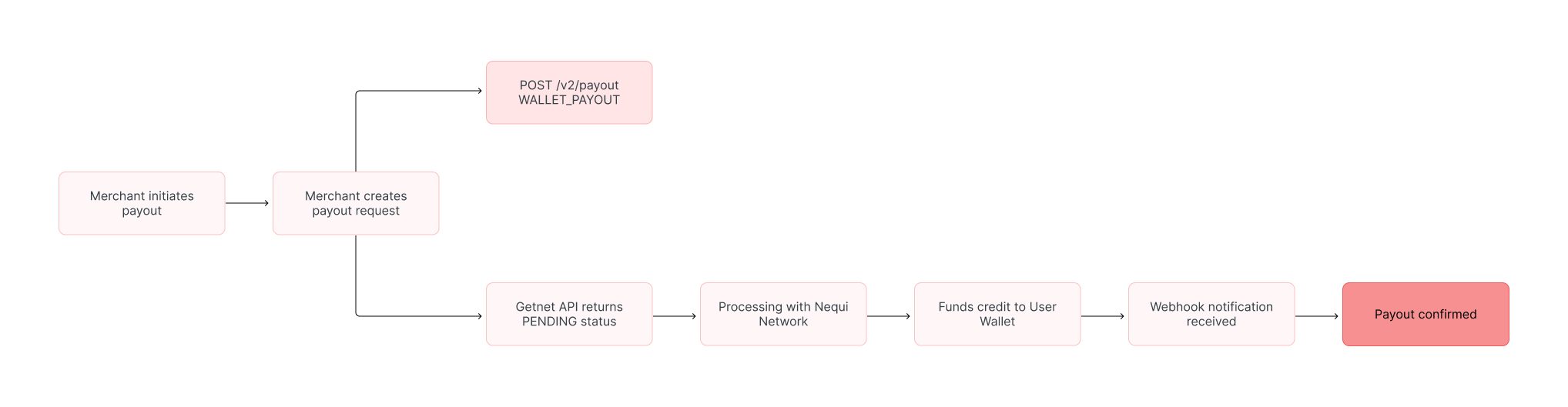
The diagram below illustrates the business flow for a Nequi Payout:
 #### 1. Create the payout request
To initiate the transfer, call the **Create Payout** endpoint. You must specify the `payment_method` as `WALLET_PAYOUT` and provide the customer's Nequi phone number.
The `customer.phone_number` is the key identifier for the Nequi account. It must be exactly **10 digits** long.
**Sample Request:**
```bash
curl --location --request POST '[https://api.pre.globalgetnet.com/dpm/payments-gwproxy/v2/payouts](https://api.pre.globalgetnet.com/dpm/payments-gwproxy/v2/payouts)' \
--header 'Content-Type: application/json' \
--header 'x-seller-id: your-seller-id' \
--header 'country: CO' \
--header 'Authorization: Bearer ' \
--data-raw '{
"idempotency_key": "payout-unique-key-001",
"request_id": "req-payout-001",
"order_id": "payout-ref-12345",
"data": {
"amount": 50000,
"currency": "COP",
"customer_id": "cust-001",
"payment": {
"payment_method": "WALLET_PAYOUT",
"brand": "NEQUI",
"soft_descriptor": "PAYOUT MERCHANT"
},
"additional_data": {
"callback_url": "[https://your-domain.com/webhook/payouts](https://your-domain.com/webhook/payouts)",
"customer": {
"phone_number": "3001234567",
"email": "john.smith@email.com",
"document_number": "12345678",
"document_type": "CC",
"first_name": "John",
"last_name": "Smith"
}
}
}
}'
```
**Sample Response:**
```json
{
"idempotency_key": "payout-unique-key-001",
"seller_id": "your-seller-id",
"payment_id": "payout-nequi-998877",
"order_id": "payout-ref-12345",
"amount": "50000",
"currency": "COP",
"status": "PENDING",
"payment_method": "WALLET_PAYOUT",
"received_at": "2025-11-20T14:30:00.000Z",
"reason_code": "00",
"reason_message": "Payout request accepted. Processing funds transfer."
}
```
#### 2. Verify payout status
The request is processed asynchronously. Do not poll the API; instead, listen for the **Webhook notification** sent to your `callback_url`.
* **`APPROVED`**: The funds are now available in the customer's Nequi account.
* **`DECLINED`**: The payout failed (Invalid phone number, account inactive, or monthly limits exceeded).
## Refunds and cancellations
Nequi payments support refunds:
* **Refunds:** Available for settled transactions. You can perform full or partial refunds.
* **Cancellations:** If a payment is still in a `PENDING` state (e.g., customer hasn't accepted the push yet), it may be cancellable depending on the specific provider timeout, but typically Nequi transactions are either approved or expire.
To process a refund, follow the instructions in the [Refund a Payment guide](/en/global-api/sep-api/payment-guides-api/card-payments/refund-payment).
## Read more
- Review [Authentication](/en/global-api/sep-api/first-steps-api/authentication) for token management and security best practices.
#### 1. Create the payout request
To initiate the transfer, call the **Create Payout** endpoint. You must specify the `payment_method` as `WALLET_PAYOUT` and provide the customer's Nequi phone number.
The `customer.phone_number` is the key identifier for the Nequi account. It must be exactly **10 digits** long.
**Sample Request:**
```bash
curl --location --request POST '[https://api.pre.globalgetnet.com/dpm/payments-gwproxy/v2/payouts](https://api.pre.globalgetnet.com/dpm/payments-gwproxy/v2/payouts)' \
--header 'Content-Type: application/json' \
--header 'x-seller-id: your-seller-id' \
--header 'country: CO' \
--header 'Authorization: Bearer ' \
--data-raw '{
"idempotency_key": "payout-unique-key-001",
"request_id": "req-payout-001",
"order_id": "payout-ref-12345",
"data": {
"amount": 50000,
"currency": "COP",
"customer_id": "cust-001",
"payment": {
"payment_method": "WALLET_PAYOUT",
"brand": "NEQUI",
"soft_descriptor": "PAYOUT MERCHANT"
},
"additional_data": {
"callback_url": "[https://your-domain.com/webhook/payouts](https://your-domain.com/webhook/payouts)",
"customer": {
"phone_number": "3001234567",
"email": "john.smith@email.com",
"document_number": "12345678",
"document_type": "CC",
"first_name": "John",
"last_name": "Smith"
}
}
}
}'
```
**Sample Response:**
```json
{
"idempotency_key": "payout-unique-key-001",
"seller_id": "your-seller-id",
"payment_id": "payout-nequi-998877",
"order_id": "payout-ref-12345",
"amount": "50000",
"currency": "COP",
"status": "PENDING",
"payment_method": "WALLET_PAYOUT",
"received_at": "2025-11-20T14:30:00.000Z",
"reason_code": "00",
"reason_message": "Payout request accepted. Processing funds transfer."
}
```
#### 2. Verify payout status
The request is processed asynchronously. Do not poll the API; instead, listen for the **Webhook notification** sent to your `callback_url`.
* **`APPROVED`**: The funds are now available in the customer's Nequi account.
* **`DECLINED`**: The payout failed (Invalid phone number, account inactive, or monthly limits exceeded).
## Refunds and cancellations
Nequi payments support refunds:
* **Refunds:** Available for settled transactions. You can perform full or partial refunds.
* **Cancellations:** If a payment is still in a `PENDING` state (e.g., customer hasn't accepted the push yet), it may be cancellable depending on the specific provider timeout, but typically Nequi transactions are either approved or expire.
To process a refund, follow the instructions in the [Refund a Payment guide](/en/global-api/sep-api/payment-guides-api/card-payments/refund-payment).
## Read more
- Review [Authentication](/en/global-api/sep-api/first-steps-api/authentication) for token management and security best practices.