# MB WAY — Portugal
 MB WAY is a premier mobile wallet payment solution in Portugal. It allows customers to authorize transactions directly through their mobile banking application using a registered phone number. This method provides instant confirmation via push notifications and maintains high security by not sharing sensitive financial details during the transaction.
## Requirements
Complete the following steps before integrating MB WAY:
* **Authentication:** Generate an access token using the [Authentication endpoint](https://docs.globalgetnet.com/en/products/online-payments/regional-api/swagger#tag/authentication).
* **App Readiness:** Ensure the customer has the MB WAY application installed and a phone number successfully registered with the service.
* **Activation:** Contact your Account Manager to validate eligibility and activate this payment method for your account.
## Use Cases Specifics
When integrating any Getnet solution, market-specific requirements apply. MBWay is only available in Portugal and only for EUR currency. To know more about the specific requirements of Portugal, be sure to review the resources below before you go live:
- [Currency codes](https://docs.globalgetnet.com/en/articles?article=currency-codes)
- [Document types](https://docs.globalgetnet.com/en/articles?article=document-types)
- [Local taxes and regulations](https://docs.globalgetnet.com/en/articles?article=taxes-and-regulations)
## Characteristics
| Capability | Details |
| :--- | :--- |
| **Customer Experience** | **Push Notification** — Sent directly to the customer's mobile device via the MB WAY app. |
| **Credentials** | **Phone Number** — Required in the format `countryCode#phoneNumber`. |
| **Settlement** | **Asynchronous** — Transactions move from `PENDING` to `APPROVED` or `CANCELED`. |
| **Confirmation** | **Webhooks** — Used for real-time status updates following customer action. |
## Available Features
| Payment Flow | Supported Countries | Purchases | Refunds | Partial Refunds | Multiple Refunds |
| :--- | :--- | :---: | :---: | :---: | :---: |
| Wallet | Portugal (PT) | ✅ | ✅ | ✅ | ✅ |
-----
## Integration Flow
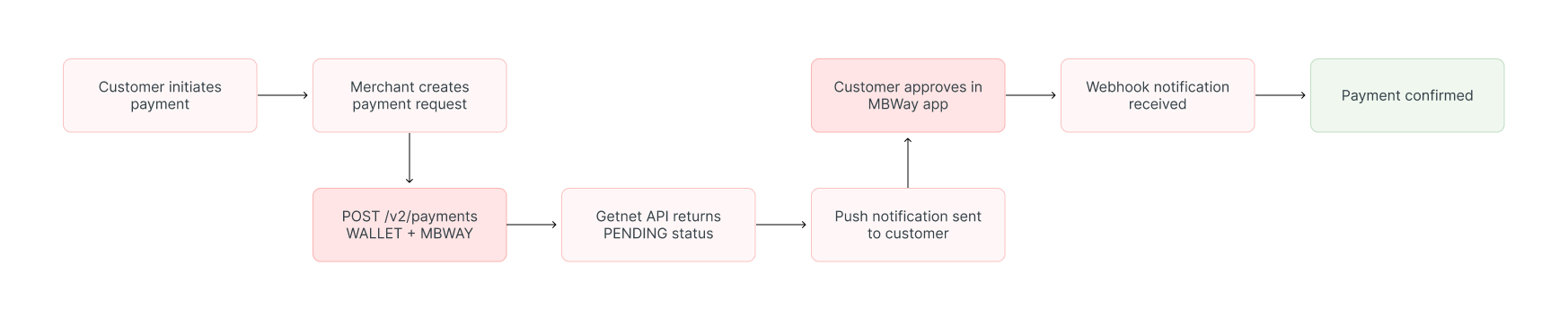
Implement the MB WAY flow by collecting customer data on your frontend and handling the asynchronous authorization result from the MB WAY app.
### 1. Create the Payment Request
Call the [Create – Authorize endpoint](https://docs.globalgetnet.com/en/products/online-payments/regional-api/swagger#tag/payments/post/dpm/payments-gwproxy/v2/payments) using the attributes defined below. Ensure all transaction data is nested within the `data` object.
| Attribute | Description | Constraint |
| :--- | :--- | :--- |
| `amount` | Total transaction amount in cents | Integer (e.g., `1200` for €12.00) |
| `currency` | ISO currency code | Must be `EUR` |
| `order_id` | Merchant reference for reconciliation | **Maximum 32 characters** |
| `phone_number` | Customer's registered phone number | Format: `countryCode#phoneNumber` |
**Request Example:**
```bash
curl --request POST \
--url https://api-sbx.globalgetnet.com/dpm/payments-gwproxy/v2/payments \
--header 'authorization: Bearer ' \
--header 'content-type: application/json' \
--data '{
"idempotency_key": "63c7f8ee-51a6-470d-bb76-ef762b62bfb7",
"request_id": "daac03dc-73db-453f-9bea-b1391669d5d3",
"data": {
"amount": 1200,
"payment": {
"payment_id": "e9595164-deaa-4341-bb37-b4b9c570a6d3",
"payment_method": "MBWAY"
},
"currency": "EUR",
"order": {
"order_id": "ORDER_12345678901234567890123456",
"sales_tax": 0,
"product_type": "physical"
},
"customer": {
"phone_number": "351#910000000",
"email": "customer@example.com"
}
}
}'
```
### 2. Handle the Customer Approval
Once the request is submitted, the following sequence occurs:
1. **Notification:** The customer receives a push notification on their mobile device.
2. **Authorization:** The customer opens the MB WAY app to review and authorize the payment.
3. **Final Status:**
* **Approved:** Status updates to `APPROVED`.
* **Declined/Timed Out:** Status updates to `CANCELED`.
## Post-Sale Operations
### Refunds and Cancellations
MB WAY supports flexible post-sale management for both settled and unsettled transactions.
* **Cancellations:** Performed on the same day as the transaction before the daily cutoff. **Partial cancellations are supported**.
* **Refunds:** Performed after transaction settlement. Both **full and partial refunds** are supported, and you may execute multiple refunds against a single transaction.
To process a refund or cancellation, follow the instructions in the [Refund a Payment guide](/en/global-api/sep-api/payment-guides-api/card-payments/refund-payment).
## Read more
- Review [Authentication](/en/global-api/sep-api/first-steps-api/authentication) for token management and security best practices.
-----------------
## MBWay Payments
MBWay is a mobile wallet payment solution widely used in Portugal, created by SIBS. It allows customers to authorise payments directly from their mobile banking app using their phone number, delivering instant confirmation through push notifications without exposing card details. The Global API supports MBWay as a wallet payment method.
This guide provides instructions for integrating MBWay payments, including request examples, push notification handling, and webhook processing.
## Requirements
Before integrating MBWay you need to:
- Generate an access token through the [Authentication endpoint](https://docs.globalgetnet.com/en/products/online-payments/regional-api/swagger#tag/authentication).
- Configure a public HTTPS `callback_url` that receives status updates when customers approve or decline payments in their MBWay app.
- Ensure customers have the MBWay app installed and their phone number registered with MBWay.
> To enable MBWay you must work with your Account Manager, who validates eligibility and activates the payment method.
## Use Cases Specifics
When integrating any Getnet solution, market-specific requirements apply. MBWay is only available in Portugal and only for EUR currency. To know more about the specific requirements of Portugal, be sure to review the resources below before you go live:
- [Currency codes](https://docs.globalgetnet.com/en/articles?article=currency-codes)
- [Document types](https://docs.globalgetnet.com/en/articles?article=document-types)
- [Local taxes and regulations](https://docs.globalgetnet.com/en/articles?article=taxes-and-regulations)
You can also use [test cards](https://docs.globalgetnet.com/en/articles?article=test-cards) to simulate specific scenarios.
## Characteristics
The table below summarizes the shared behavior and requirements for MBWay payments.
| Capability | Details |
| ---------- | ------- |
| Customer interaction | Push notification sent to customer's mobile device via MBWay app |
| Credentials required | Customer's MBWay-enabled phone number in format `countryCode#phoneNumber` |
| Confirmation | Asynchronous: initial `PENDING` status, then `APPROVED` or `DECLINED` via webhook |
| Notifications | Webhooks for asynchronous status updates when customer approves/declines |
After you create the payment request, a push notification is sent to the customer's device. The customer opens their MBWay app to approve or decline the payment. Status updates are delivered via webhooks to your `callback_url`.
## Available features
Use the matrix below to confirm the scenarios currently supported for MBWay.
| Payment flow | Supported countries | Purchases | Refunds | Partial refunds | Multiple refunds | Pre-authorizations |
| :----------: | :-----------------: | :-------: | :-----: | :-------------: | :--------------: | :----------------: |
| Wallet | Portugal | ✅ | ✅ | ✅ | ✅ | ❌ |
## Payment flow
This section guides you through the complete process of implementing MBWay payments, from collecting customer information to handling the payment response and webhook notifications. The diagram below provides an overview of a payment with Mbway:

### 1. Create the payment request
As this is a direct payment flow, you must first implement a payment form on your frontend to collect the necessary customer information. Once collected, call the [Create – Authorize endpoint](https://docs.globalgetnet.com/en/products/online-payments/regional-api/swagger#tag/payments/post/dpm/payments-gwproxy/v2/payments) with the attributes below.
The table outlines the minimum fields required for an MBWay payment.
| Attribute | Description | Required value |
| :-------- | :---------- | :------------- |
| `payment_method` | Wallet payment method | `WALLET` |
| `brand` | MBWay brand identifier | `MBWAY` |
| `callback_url` | Where status updates are sent | Your HTTPS endpoint |
| `amount` | Transaction amount in cents | Integer (e.g. `5000` for €50.00) |
| `currency` | ISO currency code | `EUR` |
| `order_id` | Merchant reference for reconciliation | Unique string |
| `customer.phone` | Customer's MBWay phone number (mandatory) | Format: `countryCode#phoneNumber` |
> **Phone number format**: Use `countryCode#phoneNumber` (e.g., `351#912345678`). Do not include `+`, spaces, or dashes. Country code: 1-4 digits. Phone number: 6-15 digits.
The following sample request shows how to initialize an MBWay payment.
```bash
curl --request POST \
--url https://api-sbx.globalgetnet.com/dpm/payments-gwproxy/v2/payments \
--header 'authorization: Bearer ' \
--header 'content-type: application/json' \
--header 'x-seller-id: 54f88e68-7764-4e87-8830-756b1e2c02f8' \
--header 'x-transaction-channel-entry: XX' \
--data '{
"idempotency_key": "{{$randomUUID}}",
"request_id": "{{$guid}}",
"order_id": "{{order_id_mb}}",
"data": {
"amount": 5000,
"currency": "EUR",
"payment": {
"payment_method": "WALLET",
"brand": "MBWAY"
},
"additional_data": {
"customer": {
"phone_number": "55#11980585984",
"billing_address": {
"district": "B",
"city": "City Z",
"state": "SP",
"country": "PT",
"postal_code": "05781000",
"complement": "N/A"
}
},
"shippings": {
"address": {
"street": "R a",
"number": "1",
"district": "B",
"city": "City Z",
"state": "SP",
"country": "PT",
"postal_code": "05781000",
"complement": "N/A"
}
}
}
}
}
```
The API responds with a payload similar to the example below.
```json
{
"idempotency_key": "5befb59b-85be-46cd-b924-ec77f5b75d5c",
"seller_id": "2ee453aa-3ab6-447b-becf-d9d4360051eb",
"payment_id": "32f5b40-466c-4640-ad32-5a62f7dd0173",
"order_id": "lrzrlxc4y04lnuddhioerpcz442wu0g4",
"amount": "5000",
"currency": "EUR",
"status": "WAITING",
"received_at": "2026-04-15T17:52:55.422Z",
"transaction_id": "lrzrlxc4y04lnuddhioerpcz442wu0g4",
"reason_code": "00",
"reason_message": "Pending",
"acquirer_transaction_id": "s23iDV9z9GUwpS11Hm9j"
}
```
### 2. Customer approval flow
After the API call, the following sequence occurs:
1. **Push Notification**: A notification is sent to the customer's mobile device (typically within 1-5 seconds).
2. **MBWay App**: The customer opens their MBWay app and sees the payment request details.
3. **Customer Action**:
* Approves payment → Status becomes `APPROVED` (webhook sent)
* Declines payment → Status becomes `DECLINED` (webhook sent)
* No action (timeout after 5-10 minutes) → Status becomes `DECLINED` (webhook sent)
### 3. Verify payment status
When the customer approves the payment in their MBWay app, a webhook notification is sent with the updated payment status. You can also periodically check the payment status using the [Get Transaction endpoint](https://docs.globalgetnet.com/en/products/online-payments/regional-api/swagger#tag/payment-record-management/get/dpm/hub-payment-info/v1/payments/info/{payment_id}).
## Refunds and cancellations
MBWay payments support both cancellations and refunds:
- **Cancellations**: Available for same-day transactions before the daily cutoff time. Only full cancellations are supported (no partial cancellations).
- **Refunds**: Available for transactions after settlement. Both full and partial refunds are supported, and multiple refunds are allowed.
To process a refund or cancellation, follow the instructions in the [Refund a Payment guide](/en/global-api/sep-api/payment-guides-api/card-payments/refund-payment).
For detailed information about refund timing, cutoff times, and country-specific availability, refer to the [Core Cards reference](https://docs.globalgetnet.com/en/products/online-payments/regional-api?reference-core-cards-and-availability).
## Read more
- Review [Authentication](/en/global-api/sep-api/first-steps-api/authentication) for token management and security best practices.
MB WAY is a premier mobile wallet payment solution in Portugal. It allows customers to authorize transactions directly through their mobile banking application using a registered phone number. This method provides instant confirmation via push notifications and maintains high security by not sharing sensitive financial details during the transaction.
## Requirements
Complete the following steps before integrating MB WAY:
* **Authentication:** Generate an access token using the [Authentication endpoint](https://docs.globalgetnet.com/en/products/online-payments/regional-api/swagger#tag/authentication).
* **App Readiness:** Ensure the customer has the MB WAY application installed and a phone number successfully registered with the service.
* **Activation:** Contact your Account Manager to validate eligibility and activate this payment method for your account.
## Use Cases Specifics
When integrating any Getnet solution, market-specific requirements apply. MBWay is only available in Portugal and only for EUR currency. To know more about the specific requirements of Portugal, be sure to review the resources below before you go live:
- [Currency codes](https://docs.globalgetnet.com/en/articles?article=currency-codes)
- [Document types](https://docs.globalgetnet.com/en/articles?article=document-types)
- [Local taxes and regulations](https://docs.globalgetnet.com/en/articles?article=taxes-and-regulations)
## Characteristics
| Capability | Details |
| :--- | :--- |
| **Customer Experience** | **Push Notification** — Sent directly to the customer's mobile device via the MB WAY app. |
| **Credentials** | **Phone Number** — Required in the format `countryCode#phoneNumber`. |
| **Settlement** | **Asynchronous** — Transactions move from `PENDING` to `APPROVED` or `CANCELED`. |
| **Confirmation** | **Webhooks** — Used for real-time status updates following customer action. |
## Available Features
| Payment Flow | Supported Countries | Purchases | Refunds | Partial Refunds | Multiple Refunds |
| :--- | :--- | :---: | :---: | :---: | :---: |
| Wallet | Portugal (PT) | ✅ | ✅ | ✅ | ✅ |
-----
## Integration Flow
Implement the MB WAY flow by collecting customer data on your frontend and handling the asynchronous authorization result from the MB WAY app.

### 1. Create the Payment Request
Call the [Create – Authorize endpoint](https://docs.globalgetnet.com/en/products/online-payments/regional-api/swagger#tag/payments/post/dpm/payments-gwproxy/v2/payments) using the attributes defined below. Ensure all transaction data is nested within the `data` object.
| Attribute | Description | Constraint |
| :--- | :--- | :--- |
| `amount` | Total transaction amount in cents | Integer (e.g., `1200` for €12.00) |
| `currency` | ISO currency code | Must be `EUR` |
| `order_id` | Merchant reference for reconciliation | **Maximum 32 characters** |
| `phone_number` | Customer's registered phone number | Format: `countryCode#phoneNumber` |
**Request Example:**
```bash
curl --request POST \
--url https://api-sbx.globalgetnet.com/dpm/payments-gwproxy/v2/payments \
--header 'authorization: Bearer ' \
--header 'content-type: application/json' \
--data '{
"idempotency_key": "63c7f8ee-51a6-470d-bb76-ef762b62bfb7",
"request_id": "daac03dc-73db-453f-9bea-b1391669d5d3",
"data": {
"amount": 1200,
"payment": {
"payment_id": "e9595164-deaa-4341-bb37-b4b9c570a6d3",
"payment_method": "MBWAY"
},
"currency": "EUR",
"order": {
"order_id": "ORDER_12345678901234567890123456",
"sales_tax": 0,
"product_type": "physical"
},
"customer": {
"phone_number": "351#910000000",
"email": "customer@example.com"
}
}
}'
```
### 2. Handle the Customer Approval
Once the request is submitted, the following sequence occurs:
1. **Notification:** The customer receives a push notification on their mobile device.
2. **Authorization:** The customer opens the MB WAY app to review and authorize the payment.
3. **Final Status:**
* **Approved:** Status updates to `APPROVED`.
* **Declined/Timed Out:** Status updates to `CANCELED`.
## Post-Sale Operations
### Refunds and Cancellations
MB WAY supports flexible post-sale management for both settled and unsettled transactions.
* **Cancellations:** Performed on the same day as the transaction before the daily cutoff. **Partial cancellations are supported**.
* **Refunds:** Performed after transaction settlement. Both **full and partial refunds** are supported, and you may execute multiple refunds against a single transaction.
To process a refund or cancellation, follow the instructions in the [Refund a Payment guide](/en/global-api/sep-api/payment-guides-api/card-payments/refund-payment).
## Read more
- Review [Authentication](/en/global-api/sep-api/first-steps-api/authentication) for token management and security best practices.
-----------------
## MBWay Payments
MBWay is a mobile wallet payment solution widely used in Portugal, created by SIBS. It allows customers to authorise payments directly from their mobile banking app using their phone number, delivering instant confirmation through push notifications without exposing card details. The Global API supports MBWay as a wallet payment method.
This guide provides instructions for integrating MBWay payments, including request examples, push notification handling, and webhook processing.
## Requirements
Before integrating MBWay you need to:
- Generate an access token through the [Authentication endpoint](https://docs.globalgetnet.com/en/products/online-payments/regional-api/swagger#tag/authentication).
- Configure a public HTTPS `callback_url` that receives status updates when customers approve or decline payments in their MBWay app.
- Ensure customers have the MBWay app installed and their phone number registered with MBWay.
> To enable MBWay you must work with your Account Manager, who validates eligibility and activates the payment method.
## Use Cases Specifics
When integrating any Getnet solution, market-specific requirements apply. MBWay is only available in Portugal and only for EUR currency. To know more about the specific requirements of Portugal, be sure to review the resources below before you go live:
- [Currency codes](https://docs.globalgetnet.com/en/articles?article=currency-codes)
- [Document types](https://docs.globalgetnet.com/en/articles?article=document-types)
- [Local taxes and regulations](https://docs.globalgetnet.com/en/articles?article=taxes-and-regulations)
You can also use [test cards](https://docs.globalgetnet.com/en/articles?article=test-cards) to simulate specific scenarios.
## Characteristics
The table below summarizes the shared behavior and requirements for MBWay payments.
| Capability | Details |
| ---------- | ------- |
| Customer interaction | Push notification sent to customer's mobile device via MBWay app |
| Credentials required | Customer's MBWay-enabled phone number in format `countryCode#phoneNumber` |
| Confirmation | Asynchronous: initial `PENDING` status, then `APPROVED` or `DECLINED` via webhook |
| Notifications | Webhooks for asynchronous status updates when customer approves/declines |
After you create the payment request, a push notification is sent to the customer's device. The customer opens their MBWay app to approve or decline the payment. Status updates are delivered via webhooks to your `callback_url`.
## Available features
Use the matrix below to confirm the scenarios currently supported for MBWay.
| Payment flow | Supported countries | Purchases | Refunds | Partial refunds | Multiple refunds | Pre-authorizations |
| :----------: | :-----------------: | :-------: | :-----: | :-------------: | :--------------: | :----------------: |
| Wallet | Portugal | ✅ | ✅ | ✅ | ✅ | ❌ |
## Payment flow
This section guides you through the complete process of implementing MBWay payments, from collecting customer information to handling the payment response and webhook notifications. The diagram below provides an overview of a payment with Mbway:

### 1. Create the payment request
As this is a direct payment flow, you must first implement a payment form on your frontend to collect the necessary customer information. Once collected, call the [Create – Authorize endpoint](https://docs.globalgetnet.com/en/products/online-payments/regional-api/swagger#tag/payments/post/dpm/payments-gwproxy/v2/payments) with the attributes below.
The table outlines the minimum fields required for an MBWay payment.
| Attribute | Description | Required value |
| :-------- | :---------- | :------------- |
| `payment_method` | Wallet payment method | `WALLET` |
| `brand` | MBWay brand identifier | `MBWAY` |
| `callback_url` | Where status updates are sent | Your HTTPS endpoint |
| `amount` | Transaction amount in cents | Integer (e.g. `5000` for €50.00) |
| `currency` | ISO currency code | `EUR` |
| `order_id` | Merchant reference for reconciliation | Unique string |
| `customer.phone` | Customer's MBWay phone number (mandatory) | Format: `countryCode#phoneNumber` |
> **Phone number format**: Use `countryCode#phoneNumber` (e.g., `351#912345678`). Do not include `+`, spaces, or dashes. Country code: 1-4 digits. Phone number: 6-15 digits.
The following sample request shows how to initialize an MBWay payment.
```bash
curl --request POST \
--url https://api-sbx.globalgetnet.com/dpm/payments-gwproxy/v2/payments \
--header 'authorization: Bearer ' \
--header 'content-type: application/json' \
--header 'x-seller-id: 54f88e68-7764-4e87-8830-756b1e2c02f8' \
--header 'x-transaction-channel-entry: XX' \
--data '{
"idempotency_key": "{{$randomUUID}}",
"request_id": "{{$guid}}",
"order_id": "{{order_id_mb}}",
"data": {
"amount": 5000,
"currency": "EUR",
"payment": {
"payment_method": "WALLET",
"brand": "MBWAY"
},
"additional_data": {
"customer": {
"phone_number": "55#11980585984",
"billing_address": {
"district": "B",
"city": "City Z",
"state": "SP",
"country": "PT",
"postal_code": "05781000",
"complement": "N/A"
}
},
"shippings": {
"address": {
"street": "R a",
"number": "1",
"district": "B",
"city": "City Z",
"state": "SP",
"country": "PT",
"postal_code": "05781000",
"complement": "N/A"
}
}
}
}
}
```
The API responds with a payload similar to the example below.
```json
{
"idempotency_key": "5befb59b-85be-46cd-b924-ec77f5b75d5c",
"seller_id": "2ee453aa-3ab6-447b-becf-d9d4360051eb",
"payment_id": "32f5b40-466c-4640-ad32-5a62f7dd0173",
"order_id": "lrzrlxc4y04lnuddhioerpcz442wu0g4",
"amount": "5000",
"currency": "EUR",
"status": "WAITING",
"received_at": "2026-04-15T17:52:55.422Z",
"transaction_id": "lrzrlxc4y04lnuddhioerpcz442wu0g4",
"reason_code": "00",
"reason_message": "Pending",
"acquirer_transaction_id": "s23iDV9z9GUwpS11Hm9j"
}
```
### 2. Customer approval flow
After the API call, the following sequence occurs:
1. **Push Notification**: A notification is sent to the customer's mobile device (typically within 1-5 seconds).
2. **MBWay App**: The customer opens their MBWay app and sees the payment request details.
3. **Customer Action**:
* Approves payment → Status becomes `APPROVED` (webhook sent)
* Declines payment → Status becomes `DECLINED` (webhook sent)
* No action (timeout after 5-10 minutes) → Status becomes `DECLINED` (webhook sent)
### 3. Verify payment status
When the customer approves the payment in their MBWay app, a webhook notification is sent with the updated payment status. You can also periodically check the payment status using the [Get Transaction endpoint](https://docs.globalgetnet.com/en/products/online-payments/regional-api/swagger#tag/payment-record-management/get/dpm/hub-payment-info/v1/payments/info/{payment_id}).
## Refunds and cancellations
MBWay payments support both cancellations and refunds:
- **Cancellations**: Available for same-day transactions before the daily cutoff time. Only full cancellations are supported (no partial cancellations).
- **Refunds**: Available for transactions after settlement. Both full and partial refunds are supported, and multiple refunds are allowed.
To process a refund or cancellation, follow the instructions in the [Refund a Payment guide](/en/global-api/sep-api/payment-guides-api/card-payments/refund-payment).
For detailed information about refund timing, cutoff times, and country-specific availability, refer to the [Core Cards reference](https://docs.globalgetnet.com/en/products/online-payments/regional-api?reference-core-cards-and-availability).
## Read more
- Review [Authentication](/en/global-api/sep-api/first-steps-api/authentication) for token management and security best practices.