# Troubleshooting
This guide helps you diagnose failures during an SDK White Label integration and decide what to do about each one. It covers the failures you handle in your own application. These include warm-up problems, declined payments, service errors, card-read issues, timeouts, and failed refunds.
For the full catalog of result codes and messages, see [Error codes reference](/en/getnet-toolbox/sdk-white-label/reference-sdk/error-codes).
## Read the result code first
Every failure carries a result code with a prefix that tells you the failure class. Read the prefix before anything else.
| Prefix | Class | Where it comes from |
| :--- | :--- | :--- |
| `00` | Approved | The transaction succeeded. |
| `1-` | Terminal error | Local terminal, card reading, or operator (for example, `1-02` canceled, `1-21` generic terminal error). |
| `33-` | Host error | Payment service (SEP): an HTTP error or an issuer decline. |
The code reaches your app in `TransactionResult.result`, with a human-readable `resultMessage`. Treat `00` as approval and any other value as a non-approval.
Host errors are moving from the older `4-xx` prefix to `33-xx` — the digits stay the same (`4-503` becomes `33-503`). Terminals that are not yet updated may still return `4-xxx`. Treat `4-xxx` and `33-xxx` as equivalent.
## Identify the error screen
For card flows, the SDK shows one of two error screens before returning control to your app. Pix has its own error screen.
| Screen | When it appears | What the operator should do |
| :--- | :--- | :--- |
| 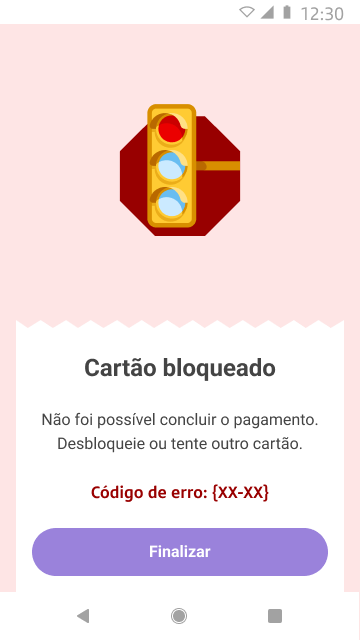 | The terminal read the card correctly, but the issuer declined the payment (`33-`). | The decline comes from the cardholder's bank, not the terminal. Ask for another card or have the customer contact their bank. |
| 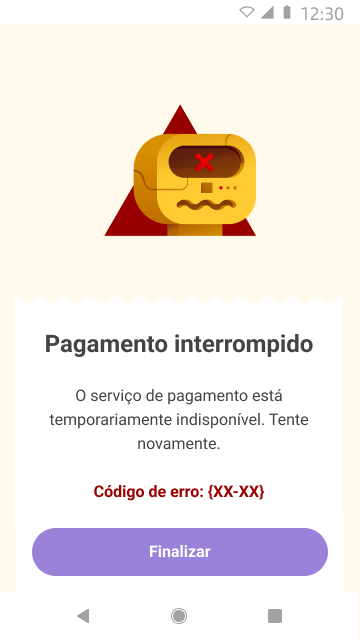 | The payment service failed or was unavailable — a host error or timeout (`33-5xx`). | Check the transaction status before retrying, so you do not charge twice. If it keeps happening across terminals, treat it as a platform incident. |
## Categorize the failure
Every non-approval falls into one of these categories. The category tells you whether to handle it in your app, ask the operator to act, or contact Getnet.
| Category | What it means | What you do |
| :--- | :--- | :--- |
| Cardholder / card | The issuer or card declined the operation. | Ask for another card or have the customer contact their bank. Not a terminal or app fault. |
| Transient — retry | A temporary condition. | Wait a few seconds and retry. After a timeout, check the transaction first. |
| Duplicate / in progress | The transaction may already be complete or canceled. | Check the printed receipt or query the payment before retrying. Do not retry blindly. |
| Reference not found | The `paymentId` or reference does not match a transaction. | Confirm the `paymentId` and the environment used in the refund or query. |
| Merchant / product configuration | The merchant, product, card brand, or terminal is not enabled for this operation. | Collect the terminal code and merchant ID and contact Getnet. |
| Authentication | The terminal could not authenticate with the gateway. | Confirm the environment and that you configured valid credentials. |
| Integration / request | Validation rejected the request, or the request was malformed. | A software issue — capture the result payload and fix the integration. |
| Platform / system | A server-side failure. | Retry once after a short wait. If it persists or affects several terminals, treat it as a platform incident. |
## Common scenarios
Each scenario states the symptom, its likely cause, and the fix.
### Warm-up fails and the SDK never becomes ready
The SDK reports `Failure(cause)` through `setOnWarmUpStatus`, or an operation never starts.
**Cause.** Warm-up loads the terminal configuration and authenticates with the payment service. It fails on a missing network connection, wrong credentials, or an unregistered terminal.
**Solution**
1. Check the terminal's Wi-Fi or mobile data.
2. Inspect the warm-up error code. `-1` to `-5` are network conditions — retry. `401` means the `clientId` / `clientSecret` or the environment is wrong. `404` means the terminal is not registered for this configuration.
3. To recover, call `ApoloSdk.shutdown()`, then configure and `build()` again.
4. If a `401`, `404`, or `422` persists, confirm the credentials, `terminalCode`, and environment with Getnet.
See the warm-up codes in [Error codes reference](/en/getnet-toolbox/sdk-white-label/reference-sdk/error-codes).
### A payment is declined
The terminal reads the card normally, but the result is `33-` and the "Payment declined" screen appears.
**Cause.** The issuer declined the authorization — for example, insufficient funds, a blocked card, or an expired card. This is a cardholder decision, not a terminal fault.
**Solution**
1. Ask the customer for another card, or have them contact their bank.
2. Escalate only if a card the customer says is valid fails on several terminals.
### "Payment interrupted" — service error
The "Payment interrupted" screen appears with a `33-5xx` code (for example, `33-500`, `33-503`, `33-504`).
**Cause.** The payment service failed or was temporarily unavailable — a server-side or timeout condition.
**Solution**
1. Do not retry immediately.
2. Query the transaction by `paymentId` to confirm whether it went through.
3. If it did not, retry once after a short wait.
4. If it persists or affects several terminals, treat it as a platform incident and contact Getnet.
### The card will not read
The terminal repeats "insert, tap, or swipe", or contactless fails.
**Cause.** A contactless or chip read failed. This is usually a normal fallback, not an error.
**Solution**
1. Ask the customer to insert the chip. If the chip fails, ask them to swipe the magnetic stripe.
2. If the terminal detects several cards at once, ask the customer to present one card, away from other cards or a wallet.
3. If a specific card fails every method, ask for another card.
### Timeout — you do not know if the customer was charged
The result is a timeout (`33-504`) or the operation ends without a clear outcome.
**Cause.** The response did not arrive within the timeout window, so the outcome is unknown — the charge may or may not have completed.
**Solution**
1. Do not start a new sale for the same amount yet.
2. Query the transaction by `paymentId` to confirm whether it was authorized.
3. Only start a new sale after you confirm the first one did not go through.
### A refund or cancellation fails with "not found"
The refund returns a `33-404` with a "not found" message.
**Cause.** The `paymentId` or the environment used for the refund does not match the original transaction. A wrong reference is the most common cause.
**Solution**
1. Confirm the `paymentId` of the original transaction.
2. Confirm you are running in the same environment where you made the sale.
3. Retry the refund with the corrected reference.
### The transaction is reported as duplicate or already exists
The result indicates the transaction is already in progress, already done, or already canceled.
**Cause.** The operation already completed, or it is still processing.
**Solution**
1. Check the printed receipt or query the payment before acting.
2. Do not repeat the operation until you confirm its real state.
## Before you contact Getnet
Some failures need Getnet support: configuration, authentication, a persistent `5xx`, a locked terminal, or an internal EMV error. Collect this information before you contact them, so support can locate the transaction and reproduce the issue.
| Collect | Detail |
| :--- | :--- |
| Result code | The full `TransactionResult.result` (for example, `33-503`, `1-21`) and the on-screen message. |
| `error_code` / `reason_code` | For host errors, the `error_code` and `reason_code` from the response payload (`details[]`). |
| `paymentId` | The `paymentId` (and `orderId`, if any) of the affected transaction. |
| Terminal | The terminal serial number and the configured `terminalCode`. |
| Environment | Pre-production, homologation, or production — which build the device runs. |
| Date and time | The date, time, and time zone of the event. |
| Scope | One card or terminal versus several — an isolated case or a widespread one. |
| Steps to reproduce | Amount, payment method, card brand, and what the operator did. |
## Next steps
* [Error codes reference](/en/getnet-toolbox/sdk-white-label/reference-sdk/error-codes) — the full catalog of host, card, and warm-up codes.
* [Transaction result reference](/en/getnet-toolbox/sdk-white-label/reference-sdk/transaction-result) — the result fields and payloads returned to your app.
* [Initialization reference](/en/getnet-toolbox/sdk-white-label/reference-sdk/initialization) — the warm-up states and how to recover from `Failure`.
* [Record telemetry](/en/getnet-toolbox/sdk-white-label/how-to-guides-sdk/record-telemetry) — log your own diagnostic entries to correlate with the SDK's traces.